So i found the Mistake in my Code, i still dont understand why it would be that way, or why it does work but here is my solution to my problem:
Just move the route.post before the route.get
where isnull(column_name, '') not like '%somevalue%' works for me. when I want to include NULL as a default in the results, converting it to a blank char allows the evaluation.
I needed this too, and I wanted it to be robust and as international-friendly as possible. I used regex and character classes to get the characters I want and array ops to split/join it together:
export function camelize(s) {
const sa = s
.replace(/[^\w\d\s]/g, '')
.toLowerCase()
.split(/\s+/);
return sa
.filter(v => !!v)
.map((w, i) => (i > 0 ? w[0].toUpperCase() + w.substr(1) : w))
.join('');
}
Enjoy!
In my case, I was attempting to write to a folder that didn't exist. I simply had to manually create the folder and then uploading succeeded.
Downgrading to mysql-connector-python 9.0.0 seemed to fix this for me.
I was having the same issue. In your example, my code would print A, B, and then exit before hitting C. Running the loggers Marcin mentioned would not give me any output.
I updated the project to the latest version - now the build works.
For me it doens't work. Can add more details?
what works for me was to uninstall it and install it again by:
pip install flask-mongoengine-3
in Additional make sure your flask version is Flask >= 2.0.0
For anyone coming here from a search turns out I can just do:
import attrs
@attrs.define
class C:
val: int | str = attrs.field(validator=attrs.validators.instance_of((str, int)))
This may mypy doesn't complain and runtime behavior is unaffected
The issue is with your code , please check get(String) method in your code , whether it exist or not in CreateParticipantContextResponse class also check whether it is being pass with the correct parameter.
Hello @Sayali and @amit We are looking for a way to get real-time audio and video streams while on a Microsoft Teams call using Node.js. We reviewed the Microsoft documentation, and it seems they only support real-time streaming with C# and .NET.
Is there a way to achieve this with Node.js, or are there any workarounds or third-party libraries that could help us access Teams audio and video streams in real time?
Any guidance or suggestions would be greatly appreciated!
import logging
from escpos.printer import Usb
logging.basicConfig(level=logging.DEBUG)
p = Usb(0x0456, 0x0808, 0)
p.text("Hello World\n")
p.cut()`enter code here`
and i got the error, dont know why File "D:\codes\print.py", line 7, in p.text("Hello World\n")
When changing the cursor color, it is advisable to adjust the background color of the selected text and the selection cursor color in order to maintain visual consistency. Here’s the way how to achieve this on Android API 29 and later:
In shared .NET MAUI code create subclass of Entry, so you can add additional properties/bindings etc, for example create MyEntryView.cs :
using Microsoft.Maui.Controls.Shapes;
using MauiEntry = Microsoft.Maui.Controls.Entry;
namespace MyLibrary;
public class MyEntryView : MauiEntry
{
public Color CursorColor { get; set; }
}
In shared .NET MAUI code create MyEntryHandler.cs :
using Microsoft.Maui.Handlers;
namespace MyLibrary;
public partial class MyEntryHandler : EntryHandler { } //empty
Create MyEntryHandler.cs in the Platforms/Android folder:
using Android.Graphics;
using AndroidX.AppCompat.Widget;
using Microsoft.Maui.Handlers;
using Microsoft.Maui.Platform;
namespace MyLibrary;
public partial class MyEntryHandler : EntryHandler
{
protected override void ConnectHandler(AppCompatEditText platformView)
{
base.ConnectHandler(platformView);
var v = VirtualView as MyEntryView;
if (v != null)
{
PlatformView.SetBackgroundColor(Android.Graphics.Color.Transparent); //hide underline
if (v.CursorColor != null && OperatingSystem.IsAndroidVersionAtLeast(29))
{
//sets cursor color
//for older api versions app will set cursor color according to colorAccent from colors.xml
PlatformView.TextCursorDrawable.SetTint(v.CursorColor.ToPlatform());
//sets color of the selection cursors
var f = new BlendModeColorFilter(v.CursorColor.ToPlatform(), Android.Graphics.BlendMode.SrcIn);
PlatformView.TextSelectHandleLeft.SetColorFilter(f);
PlatformView.TextSelectHandleRight.SetColorFilter(f);
PlatformView.TextSelectHandle.SetColorFilter(f);
//set color of selected text
//you can expose the value of alpha to MyEntryView if you like
PlatformView.SetHighlightColor(v.CursorColor.WithAlpha((float) 0.4).ToPlatform());
}
}
}
protected override void DisconnectHandler(AppCompatEditText platformView)
{
base.DisconnectHandler(platformView);
platformView.Dispose();
}
}
Register handlers in CreateMauiApp method in the MauiProgram class like:
builder.ConfigureMauiHandlers(handlers =>
{
handlers.AddHandler(typeof(Entry), typeof(MyEntryHandler));
});
Create instance of MyEntry and place it somewhere in the view tree and that's it. Example of MyEntry :
var e = new MyEntry
{
CursorColor = Colors.Orange
//set other properties as well to fit your specification ...
};
Example of how it appears on Android :
You can easily convert
filename.ipynb
into a Python file (filename.py) using this command:
jupyter nbconvert --to python --execute filename.ipynb
but why not take advantage of the IPython command line? With a single command, you can effortlessly run your Jupyter Notebook without needing to convert it. Simply use the following command:
ipython filename.ipynb
IPython provides a wide range of features to help you improve the process's efficiency. Visit the official IPython documentation to find all that it can do.
import React, { useRef } from 'react';
import Mapbox from '@rnmapbox/maps';
import {View} from "react-native";
Mapbox.setAccessToken('YOUR_MAPBOX_ACCESS_TOKEN');
const Map = () => {
const camera = useRef<Mapbox.Camera>(null);
const map = useRef<Mapbox.MapView>(null);
const zoomLevel = 10;
return (
<View>
<Mapbox.MapView
ref={map}
styleURL="mapbox://styles/mapbox/light-v11"
projection={'globe'}
logoEnabled={false}
attributionEnabled={false}
scaleBarEnabled={false}>
<Mapbox.Camera ref={camera} zoomLevel={zoomLevel} animationMode={'flyTo'} animationDuration={2000} />
</Mapbox.MapView>
</View>
);
};
please enter about:config into the firefox address bar (confirm the info message in case it shows up) & search for bold preferences starting with security. - right-click and reset those entries to their default values.
That did the trick. I reset the following to their defaults: security.ssl.errorReporting.automatic (from true to false) security.tls.version.min (from 2 to 1)
Thats All
Best Regards
I found the reason is that you send owner as a string. You need to send the owner as an object containing the id of the related user.
POST /api/batches
{
"data": {
"name": "Test Batch",
"state": "open",
"locale": "vi",
"owner": {
"id": "rz9blkq8c0bns6bxx81heq9w"
}
}
}
Why not do it with a function?
public function maybe_add_to_array( array &$arr, string $key, $value, $condition ) {
if (!$condition){
return;
}
$arr[ $key ] = $value;
}
Well, with given code it's not clearly reproducible. I refered the code from sample app provided by 'ModernWPF' and tried to create sample with your code.
Can you provide code for NavigationTemplateSelector and how you are adding menu items ?
<Window x:Class="WpfApp.MainWindow"
xmlns="http://schemas.microsoft.com/winfx/2006/xaml/presentation"
xmlns:x="http://schemas.microsoft.com/winfx/2006/xaml"
xmlns:ui="http://schemas.modernwpf.com/2019"
xmlns:md="http://materialdesigninxaml.net/winfx/xaml/themes"
xmlns:rx="http://reactiveui.net"
xmlns:local="clr-namespace:WpfApp"
ui:WindowHelper.UseModernWindowStyle="True"
ui:ThemeManager.RequestedTheme="Dark"
Title="WPF Toolbox Example" Height="450" Width="800">
<Window.Resources>
<!-- Navigation menu item -->
<DataTemplate x:Key="NavigationViewMenuItem">
<ui:NavigationViewItem
Content="{Binding Title}"
Icon="{Binding Icon}"
IsEnabled="{Binding Selectable}"
MenuItemsSource="{Binding Children}"
SelectsOnInvoked="{Binding Selectable}"/>
</DataTemplate>
<!-- Navigation header item -->
<DataTemplate x:Key="NavigationViewHeaderItem">
<ui:NavigationViewItemHeader Content="{Binding Title}" />
</DataTemplate>
<!-- Template selector for navigation items -->
<local:NavigationTemplateSelector
x:Key="NavigationTemplateSelector"
HeaderTemplate="{StaticResource NavigationViewHeaderItem}"
ItemTemplate="{StaticResource NavigationViewMenuItem}" />
</Window.Resources>
<Grid UseLayoutRounding="True">
<ui:NavigationView
x:Name="NavigationView"
AlwaysShowHeader="True"
Grid.Row="0"
IsPaneOpen="False"
OpenPaneLength="150"
IsSettingsVisible="False"
IsBackButtonVisible="Collapsed"
IsPaneToggleButtonVisible="true"
ItemInvoked="NavigationView_ItemInvoked"
>
<ui:NavigationView.MenuItems>
<ui:NavigationViewItem Content="Menu Item1" Tag="SamplePage1" Icon="Play" >
<ui:NavigationViewItem.MenuItems>
<ui:NavigationViewItem Content="Mail" Icon="Mail" ToolTipService.ToolTip="Mail" Tag="SamplePage3"/>
<ui:NavigationViewItem Content="Calendar" Icon="Calendar" ToolTipService.ToolTip="Calendar" Tag="SamplePage4"/>
</ui:NavigationViewItem.MenuItems>
</ui:NavigationViewItem>
<ui:NavigationViewItem Content="Menu Item2" Tag="SamplePage2" Icon="Save" />
<ui:NavigationViewItem Content="Menu Item3" Tag="SamplePage3" Icon="Refresh" />
<ui:NavigationViewItem Content="Menu Item4" Tag="SamplePage4" Icon="Download" />
</ui:NavigationView.MenuItems>
<rx:RoutedViewHost
x:Name="MainHost"
Duration="0"
ToolTip="{x:Null}"
VerticalContentAlignment="Stretch"
HorizontalContentAlignment="Stretch"/>
</ui:NavigationView>
</Grid>
I am using vite + vue js + typescript This one works great:
I am using the latest packages with clion on linux as in December 2024.
also don't worry about me using typescript, javascript is already imported using ES6 and the tsconfig.json file. if your having issues and newbie to vue language please pay attention and understand the .vue is not the same as .htm/html. .vue is what you should use to create the SPAs. Thanks Johnny Bahjat Kennesaw.edu
Excellent, simple solution that I was looking for as well. Thank you.
Sum of Two Values This problem from CSES problem set, Gives AC with using std::map<int, int> and gives TLE with std::unordered_map<int, int>. so definitely hashmap takes larger memory
Not ideal, but one option is to reconstruct an object with the checked type:
function typecheck<T extends Language>(code: Code<T>) {
const { lang, content } = code;
if (lang === "TYPESCRIPT") {
typecheckTS({ lang, content });
} else {
// ...
}
}
have you tried this?
psql -U postgres -d postgres -c "DROP DATABASE ""Ajp"" "
Best option in my opinion is to see the data layer tab in Tag Assistant. It'll give you a better view of the structure and it'll make it easier to create the data layer variable.
I am trying this for the first time. Can someone explain this step by step? I am trying to have the workbook tab name update with the value in cell B2.
For iOS 18.1 and macOS 15 SwiftUI map, you can now get the coordinates of the middle point with this:
let middleCoord = route!.polyline.points()[route!.polyline.pointCount/2].coordinate
I have found the solution for my question.
it seems that react-three-fiber has conflicts with React 19. so by installing '@react-three/fiber@alpha' seems to fix the issue
npm install @react-three/fiber@alpha
here is the link to where I found the answer:
https://github.com/vercel/next.js/issues/66468#issuecomment-2296319798
thanks for all the answers!
The behavior you're observing with the Npgsql driver is expected. The Minimum Pool Size setting in the connection string specifies the minimum number of connections that the pool will maintain, but it does not force the pool to open these connections immediately at application startup. See more in https://www.cockroachlabs.com/docs/stable/connection-pooling.
To achieve the behavior you want, you might have to manually open connections up to the minimum pool size at application startup.
this creates a circular reference for me:
Items for Display Gallery for ReportsRequired: Filter( ReportsRequired, lbl_rg_state = state_combo_rg.Selected.Value) )
this is my filter: state_combo_rg: Sort( Distinct( Permits, State ), Value, SortOrder.Ascending )
Did you ever resolved this problem? I've also troubles to integrate wiremock with spring boot 3.3.4.
I am having the issue as well. Did find a solution ?
Have you looked at PerspectiveFilter from jhlabs? It sounds like what you're looking for.
from datetime import date, timedelta
def days_in_month(year, month):
return filter(lambda dt: dt.month == month, [date(year, month, 1) + timedelta(days=i) for i in range(31)])
run the following command in a Repo checked out the wanted branch:
git ls-remote origin 'pull/*/head' | grep -F -f <(git rev-parse HEAD) | awk -F'/' '{print $3}'
for clearing the screen use cls as cmd to clear
i have the same problem with jeep-sqlite.entry.js.
[ERROR] The package "crypto" wasn't found on the file system but is built into node. [plugin angular-browser-node-built-in]
[ng] node_modules/jeep-sqlite/dist/esm/jeep-sqlite.entry.js:2900:28:
[ng] 2900 │ var a = require("crypto");
Which Theme are you using?
Try to use Hello Elementor theme.
@Jos is right, Elementor Canvas template doesn't show any Header & Footer. Try another template like Elementor full width or Default.
Based on the Java resources, distinct() is a stateful operation that maintains some state internally to accomplish its opereation. For parallelization, filter(seen::add) with a ConcurrentHashMap.newKeySet() is better because the filter method is a stateless operation.
If you want to use .NET8 keep using it, but in global.json file keep the version 9.0.0 this is the SDK version.
Things will work fine this way.
In my case Srping Boot v3.4.0 + springdoc-openapi-starter-webmvc-ui v2.6.0 => error
Upgrading springdoc-openapi-starter-webmvc-ui to v2.7.0 => ok
Too elaborate on this as per https://nginx.org/en/CHANGES
Changes with nginx 1.15.0 05 Jun 2018
*) Change: the "ssl" directive is deprecated; the "ssl" parameter of the
"listen" directive should be used instead.
Thanks LMA, Joel, your inputs helped me a lot. I found the below way to get the OA equivalent, it was easy after read your comments
DateTime aDate = DateTime.Now;
originalDateTB.Text = aDate.ToString();
convertedDateTB.Text = aDate.ToOADate().ToString();
I did the following and got rid of the detachment without losing my changes
git branch detached-branch
git checkout detached-branch
If anybody uses Spring Boot v3.4.0 with springdoc-openapi-starter-webmvc-ui v2.6.0 and gets similar error on the swagger page, update springdoc-openapi-starter-webmvc-ui to v2.7.0 should solve the issue.
I know this is an older question, but you can just call Pageable.unpaged(Sort sort) which will create an unpaged but sorted pageable.
Try the stargazer package in R:
library(stargazer)
stargazer(df, type = "text",
summary = F,
row names = F,
title = "[You title here]",
out = "table_output.txt") # You can create a file
For the full list of functions for stargazer, follow this link: Stargazer Package
from selenium import webdriver
driver = webdriver.Chrome() # Use the appropriate WebDriver for your browser
driver.get("https://rueb.co.uk/")
html_source = driver.page_source print(html_source)
driver.quit()
Also had this issue (reproducible multiple browsers and laptops). We figured out that setting PGAdmin k8 pod to be observed by Odigos (eBPF tracing) somehow caused this issue.
Loading an SSH-based Conda environment in PyCharm can sometimes take a long time due to various reasons like network latency, misconfigured paths, or issues with the environment setup. Here are some troubleshooting steps to address the problem:
SSH into the server. Activate the Conda environment and note the Python path: bash Copy code conda activate <your_env_name> which python Use this Python path directly in PyCharm instead of relying on auto-detection. Reduce Sync Overhead:
Go to Settings > Build, Execution, Deployment > Deployment. For your SSH configuration, exclude large directories like node_modules, venv, or unnecessary Conda files. 5. Check for PyCharm Updates Ensure you are using the latest version of PyCharm, as updates often improve performance and SSH handling. 6. Debug Logs for Insight Enable detailed PyCharm logging for SSH connections: Go to Help > Diagnostic Tools > Debug Log Settings. Add the following logs: arduino Copy code #com.jetbrains.python.remote #com.jetbrains.plugins.webDeployment Try loading the environment again and check the logs for specific errors or slow steps. 7. Alternative: Use Remote Development Tools If the issue persists, consider using PyCharm’s Remote Development plugin or tools like VS Code Remote SSH for a smoother experience.
I'm also facing the same situation as you but I can't find the right answer. You have solved the above problem. Thank you
I got the same error message with an older version of OpenAI (1.11.1). The issue was caused by recent changes in the httpx package.
Downgrading to httpx==0.27.0 fixed this for me.
Although this post is from a year ago, I faced the same issue today and couldn't find a solution anywhere. My colleague and I were able to resolve it. The fix is to change the ttl parameter from a number to an object:
await this.cacheManager.set(keyRfToken, refreshToken, {ttl: 2000} as any)
Apologies, I'm no Hibernate expert, but should that be:
@Entity
public class Person {
If anyone got this error in Dec 2024 for a previously working python project:
This happens because your packages depend on six, but are not compatible with the new version of six (1.17.0) released on Dec 4, 2024.
Pinning the version to six==1.16.0 fixes the issue.
I encountered this problem when we upgraded our Flutter project to JAVA_17 and Gradle 8.
In my case, the solution was just updating all the SDK Tools in Android Studio:
Simple solution is to delete the .git file from your dir then init git again
Read (and process) all datagrams in a loop, until none is received within a time interval. A non-blocking socket and select.select can be used with a timeout to accomplish this.
In my case, it was du to the 2 MFA ( https://support.google.com/accounts/answer/185839?hl=en&co=GENIE.Platform%3DDesktop) Once configured, I was able to add my card.
Regards,
The locator identifier has to be change from form
to form > input
for element in await page.locator('form > input').all():
print(element)
<iframe src="https://www.google.com/maps/embed?pb=!1m18!1m12!1m3!1d3652.9415707688636!2d90.35780160000002!3d23.7137805!2m3!1f0!2f0!3f0!3m2!1i1024!2i768!4f13.1!3m3!1m2!1s0x27f1dcde1189f339%3A0x790f126e13687e4b!2zZ2FzIG1pc3RyeSBhbGFrOTct4KaX4KeN4Kav4Ka-4Ka4IOCmruCmv-CmuOCnjeCmpOCnjeCmsOCmvyDgpobgprLgpr7gppU!5e0!3m2!1sen!2sbd!4v1733924413211!5m2!1sen!2sbd" width="600" height="450" style="border:0;" allowfullscreen="" loading="lazy" referrerpolicy="no-referrer-when-downgrade"></iframe>
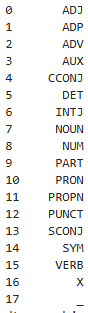
One way is to dig into Tensorflow code to see where is defined the list of POS and then import it to use in your code. You can find the list of the POS in the Github code of tensorflow Datasets there (UPOS constant): https://github.com/tensorflow/datasets/blob/master/tensorflow_datasets/core/dataset_builders/conll/conllu_dataset_builder_utils.py#L31
The item order is their index so with display(pd.Series(UPOS)), you get:
Another way would be to extract the items from the upos column of tfds.as_dataframe (taking a few rows, concatenating the upos values, splitting by the separating character and taking the set() to get the unique values.
You haven't set the request.use_ssl = true.
Take a look at this post, it's the same problem i think.
EOFError: end of file reached issue with Net::HTTP
PSI uses a specific device profile for its lab tests; local lighthouse reports use the specs of your local machine, so if you have a higher performing machine vs the test machine your lighthouse scores will bias towards indicating higher performance
Also keep in mind these reports are all lab data and don't reflect the real experience of users; consider it a rough guide to guide performance improvement projects.
你应该给你的 objectMapper添加一些配置
val objectMapper = ObjectMapper().registerKotlinModule()
As far as I know Excel stores that value as floating-point number from their epoch which is 1st of January 1900 you need to calc the days since them and include the fractional part of the current day.
You can find your answer here https://discuss.appium.io/t/androidfindby-unsupported-css-selector/36733/3.
Using
initElements(new AppiumFieldDecorator(appDriver), this); instead of PageFactory.initElements(appDriver, this); should fix your Problem. Please don't use XPath instead of id as it is much slower and not reliable.
try creating them in a wrap of try ... finally
My problem was that I was stubbornly trying to implement createBrowserRouter that is essentially not compatible with my scenario.
Thanks to the comment by @DrewReese I switched to createHashRouter
import { createHashRouter } from "react-router-dom";
import { HomeView } from "./views/home";
import { SceneryView } from "./views/scenery";
import { NotFoundView } from "./views/not-found";
import { DefaultLayout } from "./layouts/default-layout";
import { PatientView } from "./views/patient";
import { PatientEndView } from "./views/patient-end";
import { CompletedView } from "./views/completed";
const router = createHashRouter([
{
path: "/",
element: <DefaultLayout />,
children: [
{
index: true,
element: <HomeView />,
},
{
path: "decision-pathways/scenery/:id",
element: <SceneryView />,
},
{
path: "decision-pathways/patient/:sceneryId/:patientId",
element: <PatientView />,
},
{
path: "decision-pathways/patient/end/:sceneryId/:patientId",
element: <PatientEndView />,
},
{
path: "decision-pathways/completed",
element: <CompletedView />,
},
],
},
{
path: "*",
element: <NotFoundView />,
},
]);
export default router;
What's the difference? Basically createHashRouter add an hashtag before react "internal" route. In this way the web server ignores whatever is after that hashtag and resolves always to the same file, in this case my index.html.
For the resources all that is needed to change the paths to relative ones is this line in vite.config.js:
base: "./"
This sometimes happens because of SHA-1 mismatch. Don't forget to download the google-servce.json from Firebase if you update your SHA-1.
As this is a client side issue its solution lies in the client side.
I just needed to configure cookies in client side:
builder.Services
.AddAuthentication(...)
.AddCookie(CookieAuthenticationDefaults.AuthenticationScheme, o =>
{
o.Cookie.MaxAge = TimeSpan.FromDays(180);
})
.AddOpenIdConnect(...);
Al subir a la version SDK52 ya trae por defecto NavigationContainer . No se debe agregar nada.
Hover over in Runner class --> import io.cucumber.junit.Cucumber;
Click on "Organize imports" Suggestion.
This should remove the failure underline.
For the same issue on macOS, I added the following line at the end of my ~/.zshrc file. I hope this helps anyone facing a similar problem:
export PATH=$PATH:~/go/bin
I can't say this will be particularly useful to what you're trying to do, but the whole EDGE integration capability that supported the legacy Guidewire digital products (the non-Jutro ProducerEngage, etc products) is built on a dependency injection framework. That is tightly linked to the JSON-RPC entry point so it's not intended to be used in a more general sense but if you're looking for an example that's the best one generally available that I'm aware of.
For modern usage where the GWCP Cloud APIs are intended as the primary entry point into the IS applications that example isn't particularly useful or informative. If you can share more information about what problem you're trying to solve the community may have more feedback.
I was running into the same issue with kaleido (python 3.13, running on ubuntu wsl)
I could install uv add kaleido==0.2.0, might work for you if you do not specifically need 0.2.1
I have had the same problem, checking the filament repository for the same issue some people said to force livewire to downgrade
Inside composer.json
"livewire/livewire": "3.5.12"
Then use composer to update livewire
composer update livewire/livewire
By removing @Component, the filter will not be picked up automatically by the servlet container.
@Slf4j
//@Component -> Remove this
@RequiredArgsConstructor
public class JwtAuthenticationFilter implements WebFilter {
private final JwtTokenProvider jwtTokenProvider;
@NonNull
@Override
public Mono<Void> filter(@NonNull ServerWebExchange exchange, @NonNull WebFilterChain chain) {
log.debug("Processing request: {} {} at {}", exchange.getRequest().getMethod(), exchange.getRequest().getPath(), System.currentTimeMillis());
String token = resolveToken(exchange.getRequest());
if (StringUtils.hasText(token) && this.jwtTokenProvider.isTokenValid(token)) {
return chain.filter(exchange).contextWrite(ReactiveSecurityContextHolder.withAuthentication(this.getAuthentication(token)));
}
return chain.filter(exchange);
}
private String resolveToken(ServerHttpRequest request) {
String bearerToken = request.getHeaders().getFirst(HttpHeaders.AUTHORIZATION);
if (StringUtils.hasText(bearerToken) && bearerToken.startsWith("Bearer ")) {
return bearerToken.substring(7);
}
return null;
}
}
This avoids multiple registrations in the Spring context and ensures that the filter is only applied within the Spring Security filter chain.
@Configuration
@EnableWebFluxSecurity
@RequiredArgsConstructor
public class SecurityConfig {
private final JwtTokenProvider jwtTokenProvider;
@Bean
public SecurityWebFilterChain springSecurityFilterChain(ServerHttpSecurity http) {
JwtAuthenticationFilter jwtFilter = new JwtAuthenticationFilter(jwtTokenProvider); // add it here
return http
.csrf(ServerHttpSecurity.CsrfSpec::disable)
.cors(ServerHttpSecurity.CorsSpec::disable)
.httpBasic(ServerHttpSecurity.HttpBasicSpec::disable)
.formLogin(ServerHttpSecurity.FormLoginSpec::disable)
.logout(ServerHttpSecurity.LogoutSpec::disable)
.authorizeExchange(exchanges -> exchanges
.pathMatchers(WHITE_LIST_URL).permitAll()
.anyExchange().authenticated()
)
.addFilterAt(jwtFilter, SecurityWebFiltersOrder.AUTHENTICATION)
.build();
}
}
Solution was in fetchData settings. It takes by default 10 rows (I understand it in that way).
Query query = entityManager.createNativeQuery(...);
List<Object[]> results = query.unwrap(org.hibernate.query.NativeQuery.class).setFetchSize(1000).getResultList();
Unwrap with fetchData is the solution.
This code is used to detect only safari browser
const isSafari = /^((?!chrome|android).)*safari/i.test(navigator.userAgent)
Another possible cause of this warning is a missing quotation marks:
Wrong:
Data interface{} `json:data`
To resolve this, ensure the field tag is properly formatted with quotes, as shown below:
Correct:
Data interface{} `json:"data"`
You can achieve what you want, by processing each group in b using the following code:
import pyarrow as pa
import pyarrow.compute as pc
table = pa.table({'a': [1, 2, 3, 4, 5, 6], 'b': ['x']*3 + ['y']*3})
unique_b = pc.unique(table['b'])
cumsum_list = []
b_list = []
for value in unique_b:
mask = pc.equal(table['b'], value)
group = table.filter(mask)
cumsum = pc.cumulative_sum(group['a'])
cumsum_list.extend(cumsum)
b_list.extend(group['b'])
final_result = pa.table({'a': cumsum_list, 'b': b_list})
To visualize the result you can convert it back to pandas using:
print(final_result.to_pandas())
which returns the following:
The regular Expression "[a-zA-Z\n\W]+" will match letters, non Word Characters (e.g. Dots, Question Marks) and Line Breaks encapsulated by Double Quotes. The plus looks for a greedy match, securing that multiple line Strings are matched.
In https://rubyinstaller.org/downloads/ make sure to install the bold one.
import 'package:flutter/material.dart'; import 'package:webview_flutter/webview_flutter.dart';
class AppScreen extends StatefulWidget {
const AppScreen({super.key});
@override State createState() => _AppScreenState();
}
class _AppScreenState extends State {
final ctr = WebViewController()
..setJavaScriptMode(JavaScriptMode.unrestricted)
//--> Add this line
..setUserAgent( "Mozilla/5.0 (Linux; Android 10; Mobile) AppleWebKit/537.36 (KHTML, like Gecko) Chrome/79.0.3945.79 Mobile Safari/537.36", // Custom user-agent )
..loadRequest(Uri.parse('yourUrl'));
@override
Widget build(BuildContext context) {
return SafeArea(
child: Scaffold(
body: WebViewWidget(
controller: ctr
),
),
);
}
}
You are facing this issue because your regular expression is not correct.
That's because the \b word boundary works well with Latin string but struggles with RTL and Unicode character.
Try to replace it with g for global and u for Unicode chars
const regex = new RegExp(`(${highlightWordsArray.join("|")})`, "gu")
You can check this article if you wanna discover more
I had the same issue and I it happened because I accidentally pressed the "Insert" button on my keyboard. When I went to the cell and pressed the button again, the issue disappeared.
Adding the attribute "inert" to the image prevents Edge showing the button completely but the image still displays and prints. You can wrap this with an link and a to get images to work as links.
<a href="www.bing.com" target="_top">
<div>
<img inert src="https://cdn.sstatic.net/Sites/stackoverflow/Img/apple-touch-icon.png">
</div>
</a>
The simplest solution for this is to go to the
Player Setting -> Other Settings -> Target API Level
And changing the API level to something lower (for me 'API level 33' worked fine)
I have created the following structure on my filesystem:
project
|-pb
| |-app.py
|-test_app.py
File app.py:
def run_this_function(something):
return 'FOLD', {}
def go_to_the_right_street(street_we_are_on):
if street_we_are_on == 'pre_flop_play':
action, extra_information = run_this_function('something') <--- added the string definition for 'something' instead something as variable
In this file is present only a modification (see the comment in it).
File test_app.py
import unittest
from unittest.mock import patch
from pb.app import go_to_the_right_street
# I have defined this function to substitute your function run_this_function()
def run_this_function_patch(something):
return 'FOLD', {}
class MyTestCase(unittest.TestCase):
def test_go_to_the_right_street(self):
with patch('pb.app.run_this_function') as mocked_function:
mocked_function.side_effect = [run_this_function_patch('something')] # <--- added this side_effect to return 'FOLD', {}
actual = go_to_the_right_street('pre_flop_play')
# mocked_function.return_value = 'FOLD', {} tried this too but I get the same error
mocked_function.assert_called_once()
if __name__ == '__main__':
unittest.main()
The 2 most important changes:
run_this_function_patch() which is used to define the side_effect; note the presence of the parenthesis [] and ()mocked_function.side_effect = [run_this_function_patch('something')] is defined before the calling of the function go_to_the_right_street()Whit this code the output of the execution is the following:
.
----------------------------------------------------------------------
Ran 1 test in 0.001s
OK
Not an explanation, but I raised a ticket to improve description about this as I faced same concerns, it is already processed so in near future we will have info right from a source. any upvotes will be very welcome , I wish to finally unlock Stack functionalities :) https://github.com/microsoft/vscode/issues/235133
In such cases, vconcat can handle the job by separately formatting your axis with as many layers as you need. The only downside is that you have to manually adjust the height and width of your canvas.
Add a New Computed Column to your Data Set which is an aggregation based on COUNT of any particular column (id makes most sense). In this example I call the new column numRows

Then you can refer to the variable row["numRows"] in other parts of the report, e.g. to change the visibility of a table. In this example I only want to show the table if there is exactly 1 result in the Data Set
select (substr(SDate,7,10) || '-' || substr(SDate,4,2) || '-' || substr(SDate,1,2)) as SDate2 order by SDate2 desc
There are basically the same in that context and there is no significant problems with doing *p += 1; ,it should also be noted that with modern compilers it will produce the same assembly.
You can change the tick display with plt.xticks() and use the format r'$...$' to use latex:
import matplotlib.pyplot as plt
plt.figure(figsize=(3, 3))
plt.plot(range(10, 1000), range(10, 1000))
plt.xticks([0, 200, 600, 1000],
[r'$0$', r'$2 \cdot 10^{2}$', r'$6 \cdot 10^{2}$', r'$1 \cdot 10^{3}$'])
plt.tick_params(axis='x', labelsize=8)
plt.tick_params(axis='y', labelsize=8)
plt.show()
May you share the code snippet which is serving this upload logic
The earlier answers don't show how to extract the java object into a python list[str]:
_jars_scala = spark.sparkContext._jsc.sc().listJars()
jars = [_jars_scala.apply(i) for i in range(_jars.length()]