0
Similar new issue resurfaced in 2025.
This time is due to the incompatibility with NumPy 2.x.
Simply downgrade to NumPy 1.26.x:
pip install numpy==1.26.4
or
conda install numpy==1.26.4
This will solve the Invalid property for colour.
Regards,
Hibernate/JPA doesn’t support Instant as a type for @Version. Instead, use int, long or (if you prefer a timestamp-based approach) Java.sql.Timestamp
Hibernate expects numeric values (int or long) for optimistic locking, as it automatically increments the version on update.
Instant may introduce precision issues or be handled differently by the database, leading to unexpected errors.
If a timestamp-based approach is required, java.sql.Timestamp is a better alternative.
I recommend to discover:
SPRING JPA LOCK: <https://stackoverflow.com/questions/35523428/spring-jpa-lock%5C%5C>?
@Version in SPRING JPA: <https://medium.com/@AlexanderObregon/leveraging-springs-version-for-optimistic-locking-in-jpa-bf4126ebc438%5C>?
Easily comment this line on nginx virtual host config file:
error_page 404 /404.html;
Here is a true recursive function/formula:
=LET(
x, A1,
f, LAMBDA(ME,n,[c], IF(n = 1, n, n + ME(ME, ROUNDUP(n / 6, 0), c + 1))),
f(f, x) - x
)
Hola tengo una pregunta yo estaba trabajando con visual básic 6.0 todo me iba bien..... De maravilla 👌pero resulta... Que borre un codigo del adódc y ya no hace la conexión ni se activa... Parece que es un codigo de persistencia...... Y no se que hacer...de verdad.....debe ser algún código...
X_xz, Y_xz, Z_xz = kde_projection(x, z)
Encountering the same issue running my app on my physical Android device.
Same steps as above, was working fine with Flutter 3.10.0.
First noticed it after upgrading to Flutter 3.10.1.
Running flutter clean and flutter pub get fixed it for me as well
Several SQL implementations now have (years after this question was originally asked) a "vector" type.
SQLite now has sqlite-vec : a vector search SQLite extension
MariaDB now has MariaDB Vector
PostgreSQL now has pgvector
MySQL now has the VECTOR type; (see also How do I create a field with a vector type in MySQL? and Storing vector coordinates in MySQL )
Azure SQL Database has the Vector data type
They have some advantages and disadvantages compared to the traditional "bridging table" approach in Nickthename's answer.
Have you ever try notifications 3.0.0 package as Aman Agarwal said in the comment above?
Redshift cannot execute a “script” command, multiple statements in a single command. You need to run 2 command separately in the same session. This cannot be done with odbc. I’m unsure you can use a non-odbc redshift connection in vba.
If the database is set to case sensitive then all the queries against it already have this turned on. You shouldn’t need to run the first statement. Are you just trying to get the returned column names to be capitalized? There’s gotta be a simpler excel specific way to do that. If that’s the case I’d re-ask the question without mentioning redshift at all, like how do I automatically rename columns when selecting from an odbc table in vba?
This seems to be issue with the Packaging issue.
If you want to qucikly wanted to try the DFS router with right packaging, here is the repo's and doc for DFS Router.
https://docs.acceldata.io/odp/documentation/accessing-acceldata-repositories
these builds supported/validated on jdk11 &py3, certified on RHEL-8 & ubuntu-20.
have you found how to do it yet?
Even I'm facing the same issue . Did you find a way to fix it?
I changed the function to setTimeout so it can execute after the page is fully loaded.
check sys_query_history to find the session_id of the call to the proc, then pull all rows with that session id sorted by start_time desc. The last one is the one throwing the error. Also redshift is case sensitive and Postgres isn’t so be careful it’s not a straight port.
const aaa = [
{id: 10, val: "xx"},
{id: 27, val: "tr"},
{id: 13, val: "ut"}
]
const index = aaa.findIndex(item => item.id === 27)
console.log(index)
Use the indexOf method with the object you are looking for.
let index = aaa.indexOf(bbb);
So full script would be...
const aaa = [
{id: 10, val: "xx"},
{id: 27, val: "tr"},
{id: 13, val: "ut"}
]
const bbb = aaa.find(obj => (obj.id === 27) );
let index = aaa.indexOf(bbb);
console.log(index);
Apparently... Get-ItemProperty HKLM:SOFTWARE\Microsoft\SQMClient | Select -ExpandProperty MachineID returns the same value, but is there a cleaner way to get said value?
The solution ended up being a bit of a hack. I used Platypus to make a small app out of a script that calls emacsclient on the path part of the URI. The benefit of Platypus is that I was able to register the app with an emacs URI scheme handler. I updated my XSL to generate buttons that link to that URI scheme.
I was also getting the same issue the reason for that is swift is somehow saving the temporary file somewhere else and is expecting to get that file from somewhere else
error: the replacement path doesn't exist: "/var/folders/xr/s05r623x35q5112r44hjscp40000gn/T/swift-generated-sources/@__swiftmacro_8LearnFun11ContentViewV5items33_4D86A9023CAFA1CD6AABE6049862A858LL5QueryfMa_.swift"
here The expected file should be inside swift-generated-sources but xcode is saving it to one folder above that is in T folder
laziest fix: for the compiler not to compain is to create the folder swift-generated-sources and then move the file inside that folder and if the error is still there then just rename the file to match the one in the error mine was @__swiftmacro_8LearnFun11ContentViewV5items33_4D86A9023CAFA1CD6AABE6049862A858LL5QueryfMa_.swift
I have MSB4018 error and I try any the above solutions but could not solve
Finally, I found that saving the current project in the Drive folder caused some files to be locked by Drive for syncing, and generated error MSB4018
I moved the project out of the Drive folder, the error was resolved immediately
Although it is not a solution, restarting the application worked in my case
I went with this post and it helped me! Go Wiki: Configuring-GoLand-for-WebAssembly
I'm like ten years late to this party, but I had to do something similar this week & couldn't find any solutions online so I made one:
https://spritemap-to-svg.vercel.app
Hope this helps someone!
I managed to resolve this thanks to this quote I found on a website.
I saved this quote to my notes and implemented it, but now I can't find the original source.
Anyway, I had to remove the NSHealth stuff from the watchkit app, but keep it in the main app the watchkit extension app.
Thank you that solved my problem. I actually added this to both info.plist files for the extension and the WatchKit app. It errored out so I removed both, which was my fatal error. So again, you must have these keys in the main app and the watchkit extension app but cannot have the keys in the watchkit app.
You should be able to go to Monitor > Logs > Calls and access the audio recording of the automated verification call, without the need for the function or the Twimlet.
Thanks for the Quick Reply and Info @Ivan G.
Can you please suggest on how to setup master and slave configuration when both master and slave machines are on Azure. The links provided talks about the steps to update remote_hosts etc., I have tried these with 2 windows Machines. Will the similar setup has to be done in Azure as well. If yes how do i do that Will there be any interface where i could login to the servers and get the installations and updates done?
Let me tell you why you're wrong.
First time I'm using PyDev and 12 years later, looks like it still cannot resolves "import ... as ..."
Anyone got a solution for this ?
Thanks.
I was able to get the Canon driver linux-UFRIILT-drv-v500-usen-18.tar.gz from https://www.usa.canon.com/support/p/imageclass-lbp6230dw to work on Ubuntu 24 LTS by doing the following:
1. sudo dpkg -i libgnome-keyring-common_3.12.0-1build1_all.deb with the file from https://launchpad.net/ubuntu/vivid/amd64/libgnome-keyring-common/3.12.0-1build1
2. sudo dpkg -i libgnome-keyring0_3.12.0-1build1_amd64.deb with the file from https://launchpad.net/ubuntu/disco/amd64/libgnome-keyring0/3.12.0-1build1
3. sudo dpkg -i multiarch-support_2.27-3ubuntu1_amd64.deb with the file from https://launchpad.net/ubuntu/bionic/amd64/multiarch-support/2.27-3ubuntu1
4. starting the driver install script: sudo ./install.sh
5. selecting LBP6230dw in popup window and connecting via USB
For Windows, inside below file, search for port
C:\Program Files\PostgreSQL\[version]\data\postgresql.conf
or if you are already have access to DB, try below command in POSTGRES:
SHOW config_file;
Were you able to resolve the issue? I had the same problem today, although I chalked it up to the number going through a WABA porting process. I also set up a backup Twilio number but I suspect some customer messages were inevitably lost in the meantime.
Did you find a solution to this issue? I'm having the same problem.
well,the partitionContainer view only addView and not called removeView,
jvm can't recycle object.
if constantly addview ,the memory usage wall continue to increase.
if you called removeView in other function,did you called Exoplayer.release() and Webview.destory() while call removeView?
I can't foound Other type in your picture,and can you add app starts memory usage picture?
Avatar
| header 1 | header 2 |
|---|---|
| cell 1 | cell 2 |
| cell 3 | cell 4 |
Mounting an image is now available as an experimental feature in Moby v28!
to solve this thats what i did :
await page.evaluate(() => {
return new Promise((resolve) => {
const checkTilesLoaded = () => {
const totalTiles = document.querySelectorAll('.leaflet-tile').length;
const loadedTiles = document.querySelectorAll('.leaflet-tile-loaded').length;
console.log(`Tiles loaded: ${loadedTiles}/${totalTiles}`);
if (loadedTiles === totalTiles) {
console.log('All tiles are fully loaded!');
resolve();
} else {
setTimeout(checkTilesLoaded, 500); // Retry every 500ms
}
};
checkTilesLoaded();
});
});`
await page.evaluate(() => {
const style = document.createElement('style');
style.innerHTML = `
@media print {
body {
width: 1900px;
height: 1200px;
}
}
`;
I had same issue with demucs which uses pytorch
---
I needed to install both `torchaudio` and `soundfile` in conda isolated environment
pip install torchaudio soundfile
Did you resolve this. I am also facing the same issue..
Register both services. Then register a new service that has both injected into it - and this new service will check whether the feature is enabled and invoke the relevant one.
How can I gain enough "reputation" if I can't comment or ask a question? I've already been banned from asking questions because (apparently) my previous questions were all rejected for one reason or another, although most of them were asked and explained sufficiently as far as I'm concerned. It seems like you all expect an asker to guess what others may want to see.
When I got the banned notification, it said that I could "regain the right to ask a question" if I demonstrated that I could ask ask--in your minds--a valid question. But if I can't ask a question, how can I demonstrate that?
So I can't ask, I can't comment. How much sense does that make???
npm i @ngx-translate/core@latest
The answer from Latronis works for me. It seems like the simplest and best solution.
You may even open the received file with csv reader without saving the file to disk.
It requires reopening the received file-like object:
import os, csv
infile = request.files['filename']
rtfile = os.fdopen(
infile.stream.fileno(), 'rt')
csvreader = csv.reader(rtfile)
Mounting an image RO is not supported as an experimental feature in version 28 of the Docker engine (Moby)
To remove all event listener to an element just iterate through the property and nullify event related properties.
E.g: Nullify all property that startWith on which always denotes event handlers.
for (const property in element) {
if (element[property] && property.startsWith('on')) {
element[property] = null
console.log('cleanup removed listener from ' + element.nodeName, property)
}
}
This also related to what @john-henckel. Also this only applies to a single element, its children won't be affected.
i could reopen an rb+ opened file-like, as i needed rt for csvreader.
rtfile = os.fdopen(
infile.stream.fileno(), 'rt')
I have found a perfect solution from msdn document. Now you can code like this:
First, create a label and use this code:
<Label x:Name="MenuLabel" StyleClass="LabelStyle1" Text="RightClickMenu">
<FlyoutBase.ContextFlyout>
<MenuFlyout>
<MenuFlyoutItem Text="Back" Command="{Binding BackCommand}" >
<MenuFlyoutItem.KeyboardAccelerators>
<KeyboardAccelerator Modifiers="None" Key="Left" />
</MenuFlyoutItem.KeyboardAccelerators>
</MenuFlyoutItem>
<MenuFlyoutItem Text="Forward" Command="{Binding ForwardCommand}" >
<MenuFlyoutItem.KeyboardAccelerators>
<KeyboardAccelerator Modifiers="None" Key="Right" />
</MenuFlyoutItem.KeyboardAccelerators>
</MenuFlyoutItem>
<MenuFlyoutItem Text="GoToStart" Command="{Binding GoToStartCommand}" >
<MenuFlyoutItem.KeyboardAccelerators>
<KeyboardAccelerator Modifiers="None" Key="Up" />
</MenuFlyoutItem.KeyboardAccelerators>
</MenuFlyoutItem>
<MenuFlyoutItem Text="GoToEnd" Command="{Binding GoToEndCommand}" >
<MenuFlyoutItem.KeyboardAccelerators>
<KeyboardAccelerator Modifiers="None" Key="Down" />
</MenuFlyoutItem.KeyboardAccelerators>
</MenuFlyoutItem>
</MenuFlyout>
</FlyoutBase.ContextFlyout>
</Label>
Second, hide the label. Now , You have keyboard event. It is so simple.
Attention!! the method is only available in .net core 8.
Good luck.
if you want to know more, you would read
https://learn.microsoft.com/en-us/dotnet/maui/user-interface/keyboard-accelerators?view=net-maui-8.0
thank you!
Step 1: create a detail-level formula that return 1 if PartNumber = Part. Otherwise, 0.
Step 2: create a group-level Sum (or Max) of that formula.
Step 3: Create a Group Selection Formula of @Group_Sum_Formula > 0
(or @Group_Max_formula = 1).
Got following on Win64, any suggestions?
(base) C:\Users\admin\hu_rag>conda install -c pytorch -c nvidia faiss-gpu=1.7.4 mkl=2021 blas=1.0=mkl
Collecting package metadata (current_repodata.json): done
Solving environment: failed with initial frozen solve. Retrying with flexible solve.
Collecting package metadata (repodata.json): done
Solving environment: failed with initial frozen solve. Retrying with flexible solve.
PackagesNotFoundError: The following packages are not available from current channels:
- faiss-gpu=1.7.4
Current channels:
- https://conda.anaconda.org/pytorch/win-64
- https://conda.anaconda.org/pytorch/noarch
- https://conda.anaconda.org/nvidia/win-64
- https://conda.anaconda.org/nvidia/noarch
- https://repo.anaconda.com/pkgs/main/win-64
- https://repo.anaconda.com/pkgs/main/noarch
- https://repo.anaconda.com/pkgs/r/win-64
- https://repo.anaconda.com/pkgs/r/noarch
- https://repo.anaconda.com/pkgs/msys2/win-64
- https://repo.anaconda.com/pkgs/msys2/noarch
To search for alternate channels that may provide the conda package you're
looking for, navigate to
https://anaconda.org
You can follow these steps:
1. Open Settings (Ctrl + , or Cmd + , on Mac).
2. Search for Cursor Highlight.
3. Toggle it off.
Not the answer you are, or were, looking for but, this is not possible as of February 2025. There is an open feature request, however.
Ok, I heard back from Bridge/Zillow, and per their terms of service, no matter how many reviews there are, you can only get 10. It's semi-clear from the "documentation". Oh well.
On March 1, 2025, I confirmed that this issue is still occurring. (Windows 11 OUTLOOK_Classic). My PC also experienced a situation where Application_StartUP() would not start at all, but after making Application_Startup() and Quit() public, it started working. Even after reverting to private, it still starts normally. It might have been repaired by making only Application_Quit() public as well. In fact, I had a similar issue with Windows 7 that I had been using for a long time, where StartUP() would not start, but after changing it to public, it definitely started working. Thank you. This is a translation from Google. (From Japan)
You can try something like this:
df_input = {'supply_temp':0, 'liquid_mass_flow':0,'air_inlet_temp':0}
flow = 60
inputs = np.array([45,flow*988/60000,35])
df_input = {key: input for key, input in zip(df_input.keys(),inputs)}
It appears that this is a bug in the current transaction implementation in TinkerGraph. A related bug fix has recently been merged into TinkerPop but not yet released, however there appears to be a bit more going on here than what is included in that fix.
This will need more investigation to fully explain what's going on, but I can confirm now that this is an bug with TinkerGraph and not anything wrong with your usage.
I know this is a very old issue, but I was just having this issue, and searches for a solution found a lot of people asking the same question, but no solutions. Hopefully this will help someone else…
I eventually figured out that my reference to the document picker was a local variable that was going out of scope after the picker is displayed. I believe when the view is dismissed, the picker is garbage collected before the callback occurs. I added a strong reference to the picker, and no longer get that error message, and the callbacks work correctly.
Given that you're using the dotnet command, you can generate a .gitignore file with dotnet new gitignore.
It seems to be a "hidden feature" as I don't see it come up when I type dotnet new --help.
I would think an exported results in json format should be able to dropped back in to postman to be opened. This might not answer the question. However, I found out that you could go back to your collections runs to see the history and it kept the results there.
Go to left nav click Collections >> Click collection top folder
On the main display pane which shows the "Overview", click the "Runs" tab.
This now will show your previously run collections results again.
Now click under "All tests", it will list all test and the results.
I am not sure since the implementation details are missing, but maybe you are loading the JSON via a useEffect hook in React and somehow save the data somewhere else inbetween? Then you would need to perform a cleanup action.
It is mentioned in the official docs that this should happen in strict mode, so the dev can find and fix bugs.
If you give further information, I can give a more educated guess. :)
from dateutil.parser import parse
date_obj1='08-02-25'
date_obj1 = parse(date_obj1)
date_obj2=date_obj1.date()
# below will in String form which is not operatable data processing
print(type(date_obj1)
# below is in date format which in operatable in data processing
print(type(date_obj2))
I had the same problem until I changed how I wrote comments in my code. Instead of using // Some thing, I started using curly braces like this: {/* Some thing */}.
This issue started happening after I upgraded to Expo SDK 52. If you're facing the same error, try updating your comments to this format and see if it helps!
Now with Copilot, you can also ask, and the answer it gives matches the chosen answer on this page (albeit I added quarto so it works in a .qmd file too).

Help...I am in R studio. The torch package is not functioning and the keras and tensorflow not yet.
How can I use ReLu using neuralnet? Is there another form?
If I define relu as cited above, and after I try to use neuralnet and act.fct "relu" not function either. Does anybody have any reference?
The first question can be solved as: =COUNTIF(B$1:B1; B1) (paste to A1 and fill the column)
Count all occurrences of the thing in the neighboring cell starting from row 1 ($1) to the current row.
AUTH_USER_MODEL was commented out in settings.py
If you're using Intellij, then inside the ProjectFolder/.idea/misc.xml
In there you'll see something like languageLevel="JDK_21" followed by more info
Update
From 7.3.1 versions onwards , NTLM is supported in the MS SQL driver
Connection String will look like this
jdbc:sqlserver://<server>;integratedSecurity=true;authenticationScheme=NTLM;domain=<domain>;user=<domainUser>;password=<domainUserPassword>;
It works this way:
import commands as cm
dct = cm.cmd_list
print(dct["one"])
Ok, I managed to resolve the problem. When I changed the image version to
eclipse-mosquitto:latest
it started to work fine. In this image there is mosquitto version 2.0.21, while in
eclipse-mosquitto:2
mosquitto is in version 2.0.18 and it doesn't work.
You can pass cmin = min and cmax = max inside add_surface() to get a consistent color scale across all plots:
add_surface(
z = z_matrix,
x = p1,
y = p2,
colorscale = "Viridis",
cmin = 0,
cmax = 4
)
Had struggled with this today myself, so in case anyone will have the same problem:
You need to set mediaItem property with current active MediaItem.
As option, inside your AudioHandler add this:
in constructor add:
_listenForDurationChanges
void _listenForDurationChanges() {
_player.durationStream.listen((duration) {
final index = _player.currentIndex;
final newQueue = queue.value;
if (index == null || newQueue.isEmpty) return;
final oldMediaItem = newQueue[index];
final newMediaItem = oldMediaItem.copyWith(duration: duration);
newQueue[index] = newMediaItem;
queue.add(newQueue);
mediaItem.add(newMediaItem) //without this notification will be empty;
});
}
Try to update the Node.js version. I ve tried everything and only that worked for me.
MD Arafat Hossain Shiam.
| header 1 | header 2 |
|---|---|
| cell 1 | cell 2 |
| cell 3 | cell 4 |
if ($this->journal3->settings->get('quickCheckoutAccountTelephoneField') === 'required') {
$telephone = Arr::get($this->request->post, 'order_data.telephone');
if ((utf8_strlen($telephone) == 10 ) || preg_match('/[^\d]/is', $telephone)) {
$error['telephone'] = $this->language->get('error_telephone');
}
}
in opencart 2,3,0,2 Journal theme has another register.php, this works for validation for telephone.
cmd_value = cmd_list.get(cmd)
#write this
https://github.com/facebook/react-native/issues/49245#issuecomment-2665527685
Check that the following line:
SWIFT_ACTIVE_COMPILATION_CONDITIONS = "$(inherited) DEBUG";
has been added inside project.pbxproj in debug XCBuildConfiguration block:
83CBBA201A601CBA00E9B192 /* Debug / = {
isa = XCBuildConfiguration;
buildSettings = {
ALWAYS_SEARCH_USER_PATHS = NO;
CLANG_ANALYZER_LOCALIZABILITY_NONLOCALIZED = YES;
CLANG_CXX_LANGUAGE_STANDARD = "c++20";
...
REACT_NATIVE_PATH = "${PODS_ROOT}/../../node_modules/react-native";
SDKROOT = iphoneos;
SWIFT_ACTIVE_COMPILATION_CONDITIONS = "$(inherited) DEBUG";
USE_HERMES = true;
};
name = Debug;
};
Can you also share the compiled javascript, the version of ReScript you are using, and the contents of the rescript.json file?
i have faced the same issue on my mac
Solution that worked for me:
settings -> display size to more size
then emulator will be shown bring it to bottom of screen
now set the display size to default
now its fixed, drag and drop selected item any way you want
Coming back after searching countless online solutions, this one works the best: https://www.youtube.com/watch?v=Ug7EQairnrA
The author adds withAnimation to manually alter the tab bar visibility that it works without any problem on my side.
Same problem happened to me.
"expo": "~52.0.32", "expo-dev-client": "~5.0.12"
Those versions fixed my problem. Also I have discovered that If I use an QR Scanner application instead of device own camera with SDK-52 it still failing. So install those versions and then scan your QR code with your device's built in camera app.Hope it will help.
You might try the --coverage.include <pattern> CLI argument instead.
I encoutered a similar issue. In my case, the reason was that mylocal repo was too large.
So I integrated the old history into a single commit using https://stackoverflow.com/a/50996201/22434761 .
Then, I succeeded in pushing my local repo to CodeCommit.
No, this is way beyond the capability of DTD validation.
My best guess is that you're unable to locate the correct user, possibly because the game property doesn't match the value you're expecting. I'd recommend adding an else statement after the if's where you're trying to find the user and logging the fact that you were unable to locate the user. This should help narrow down where it's going wrong.
After struggling with installation through terminals, I found an easy solution:
https://build-system.fman.io/qt-designer-download
Installed Python 3.13.2 64-bit
Windows 10 64-bit
After you create a snapshot of the disk from the “instance-template” , the missing step is you need to create a boot disk from a snapshot by:
gcloud compute disks create (DISK_NAME) --source-snapshot (SNAPSHOT_NAME) --type=hyperdisk-balanced
Then create a new instance by EXISTING DISKS option then choose the created disk above.

I am facing the same issue.
Please let me know if this issue is resolved?
Thanks,
Anu
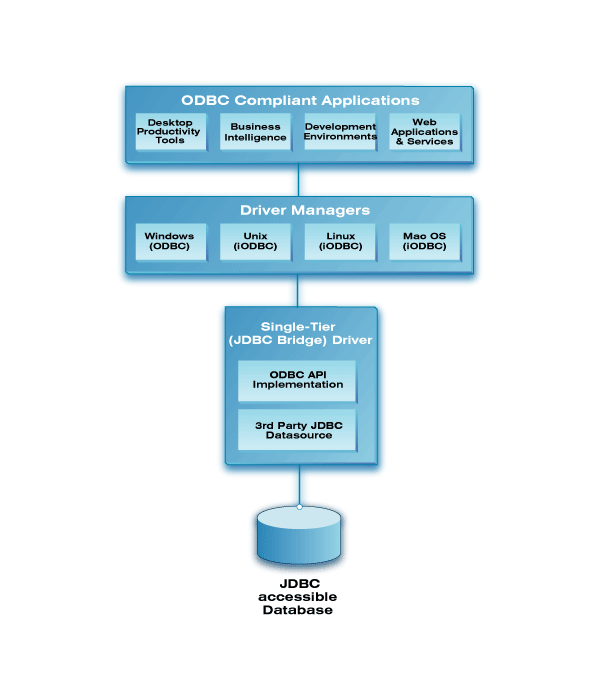
We (OpenLink Software) provide a very sophisticated ODBC-JDBC Driver that provides JDBC-accessible data sources with ODBC access from a very broad spectrum of ODBC-compliant applications and services.
These drivers exist in single-tier and multi-tier architecture forms while also being available for on a free evaluation basis -- which should help you make your final decision, cost-effectively.
Upgrading to 2sxc v18 resolved the issue as recommended in the following GitHub issue: https://github.com/2sic/2sxc/issues/3583
As every so often, a trivial mistake: The position parameters for the origin were not converted to int, but were floating point values. I can't believe the old laptop had a resolution which never resulted in .5 floats, but applying int(...) solves the issue.
Switching to wx.GenericStaticBitmap didn't help, by the way.
For me the issue was caused by using:
import { type Route } from "./+types/post"; ❌ wrong
instead of:
import type { Route } from "./+types/post"; ✅ good
Follow the solution of Afshin Rahmati. and add .name like bellow
export class SignUpDto{
@ApiProperty()
@MinLength(5, {
message: i18nValidationMessage('i18n.MIN', {message: 'err'}).name
})
username:string;
}
You can use the .getPassword() method to get a password from a JPasswordField!
Although the engineering team has an enhancement request to consider this for a future roadmap, there is currently no way to change the size constraints of a drawn signature. The alternative is to use the stamped name signature and disable the ability to draw signatures.
try this
public int x;
public SampleClass(int parameter) : this()
{
this.x = parameter;
}
ThirdMapped is {} that is not empty object but object, anything not null or undefined.
You can do something you can try to solve it with: type EmptyObject = Record<string, never>; type NormalizeEmpty = keyof T extends never ? EmptyObject : T;
gl
In Qt6, if you use cmake rather than configure (both are available), you can pass -DQT_LIBINFIX=_MyInFix to cmake.