Make it simple
print(f'[{'=' * int(percent_complete/2)}{' ' * (50 - int(percent_complete/2))}] {percent_complete:.0f}%', flush=True)
Today, the Shopify CLI service was generating an error for a period of time—at least, I encountered this error, and it later resolved itself.
Try using Yarn instead of NPM, switch to Node version 20 or 18, and repeat the process.
If there’s no result, the fact that it takes 10 minutes to execute indicates something is wrong.
From what I can see, it looks like you’re running the Shopify CLI on Linux. In that case, the simplest approach is to install a different version of Node or clear the Shopify package cache to ensure there are no errors.
Question:
Does this only happen with the shopify app init command, or does it also happen with other commands like shopify theme info?
Removing the export from the line export const authOptions will work.
For some reason, it does not like to have two exports in the route file.
Delete all images but ignore a few of the images, use this:
docker rmi $(docker images -a -q | grep -v 'image_id')
ok ....................................................................................................................................................................................................................................................................................
Snice .net7 and .net6 are end of support, you can try to install one of them.
Inspiration from MS experts' posts
im having the same problem can't get to download GitBash for window download on my win10 laptop.
This site can’t be reached objects.githubusercontent.com took too long to respond. Try:
Checking the connection Checking the proxy and the firewall Running Windows Network Diagnostics ERR_TIMED_OUT
I found https://codebeautify.org/css-beautify-minify extremely useful. It is easy to use. No need to install anything. Just save result to your css.
I don't know where the problem is, my project is a monorepo project built with pnpm workspace, by deleting the node_modules and pnpm-lock.yaml in the root directory, use pnpm install to solve this problem
You can only open one window at the same time. if you want open more, the broswer will prevent and has attention in the address bar at first time. You can get more window object if you agree with it.
Looks like a schema error. Probably one of the df in the dfs iterable. Try printing the schema of each df or post full error message.
It is mentioned here: https://firebase.google.com/docs/ios/installation-methods#crashlytics.
If using cocoa pods, use:
"${PODS_ROOT}/FirebaseCrashlytics/run"
@SpringBootApplication annotation comes with package scanning and all we don't need to repeat it. On your controllers, add requestpath separately as below,
@RestController()
@RequestMapping("/employees")
public class EmployeeController {
// methods
}
However, if you add ```
@RestController("/employees")```
only to your controllers that won't work.
Google recommends using their client(s) to interact with their service(s).
Cloud Client Libraries are the recommended option for accessing Cloud APIs programmatically, where available. source
That being said, there is not RUST client and gsutil is typically used to move big files to/from GCP. Is there any reason you can't use, for example, Google Cloud Storage: Node.js Client? ...or GO?
(2) Is there a way to resolve this, to make it work when executed?
Yes:
exec 3< <(echo "this is foobar.")
cat <&3
For me, the problem was that the app was launched at https://localhost:7065 without the base path. After I added the base path specified in launchSettings.json (e.g., https://localhost:7065/Myapp), it worked.
Instead of "useState" try "useRef" as it avoid re-renders: const numPagesState = useRef(0);
and then you can use .current method to assign values numPagesState.current = numPages
I try F1 > Help: Troubleshoot Issue to disable all extensions and reset personal settings.json. The process still eating my cpu.
Then I kill that process with htop and restart the vscode, it works.
After my test, your problem lies in the treeView1_MouseSingleClick event handler. You used treeView1.SelectedNode.Text. In some cases, SelectedNode may lag behind in displaying the previous selected value. Therefore, when you click a new node, SelectedNode has not yet updated to the node you currently clicked.
You can try to change var menuItem = treeView1.SelectedNode.Text; to var menuItem = e.Node.Text;. e is an object of type TreeNodeMouseClickEventArgs, which directly points to the currently clicked node.
In this way, menuItem will directly obtain the text of the node you clicked, and will not be affected by the delay in updating SelectedNode.
As at 2024-11-15 the CSS Working Group (csswg) proposal for issue 2084
details[open]::details-content { display: contents; }
I already knew the points in this thread by heart, but it still took me a while to realize my mistake, so I thought it would be cool to do a step-by-step guide to identify the problem... if anyone identifies another item that could generate this problem, edit the message or reply to it to add it. So here is "Everything that could be happening to generate the error No metadata found" (trying to make the list from the simplest to the most complex error):
[__dirname + '/../**/*.entity.{js,ts}'].*.ts or *.js;3.1) Declare entity at forFeature
forFeature method call of the TypeOrmModule class. If you are using NestJS with modules, this forFeature call must be present in an imports attribute of the Module decorator, either in the module file (e.g.: UserModule) or in the app module (e.g.: AppModule);connect method after initilize@Entity() decorator is present on all entity classes.autoLoadEntities to TrueAppDataSource.initialize() is awaited if necessary.dist/ Folder and Rebuilddist/ folder, especially if using NestJS, to avoid outdated compiled files.Billinginfo vs. BillingInfo.ormconfig.json and ormconfig.ts, to avoid confusion.QueryRunner, check if it is declared in the data-source related to the QueryRunner. In the event that we have more than one data-source, it is common to use one QueryRunner to access some tables and another for other tables, so you may be using the wrong data-source. e.g. In my case I have logDataSource and dataSource, the class I was trying to use was at dataSource and I was using the logDataSource QueryRunner;TypeOrmModuleAsyncOptions.Hope to help someone (or myself in the next time). Cheers
i think there might be an issue with your regex? try this:
preg_match('/<EMailAddress>([^<]+)<\/EMailAddress>/', $raw, $matches)
I was able to solve the spacing issue by wrapping each of the Radio widgets in a SizedBox and gave them a height lower than the devTools was showing me is their size (which was 48). I gave them a height of 30 and it works.
Here's a pic:
And here's the code:
Expanded(
flex: 1,
child: Column(
crossAxisAlignment: CrossAxisAlignment.start,
children: [
Row(
children: [
SizedBox(
height: 30,
child: Radio<Era>(
value: Era.ad,
groupValue: _era,
onChanged: (Era? value) {
setState(() {
_era = value;
});
},
),
),
const Text(
'A.D.',
style: TextStyle(fontSize: 10.0),
),
],
),
Row(
children: [
SizedBox(
height: 30,
child: Radio<Era>(
value: Era.bc,
groupValue: _era,
onChanged: (Era? value) {
setState(() {
_era = value;
});
},
),
),
const Text(
'B.C.',
style: TextStyle(fontSize: 10.0),
),
],
),
]),
)
]),
I had similar issues and seems like it may be resolved with one of the following ways:
(1) Have VBA switch to a different tab and then back to the tab you want right before ending the code such as using:
(1a) Sheets("sheet2").Select
(1b) Sheets("sheet1").Select or
(2) Turn off Frozen Panes in Excel or
(3) Don't use Application.ScreenUpdating = False but the code runs slower so options 1 may be the best followed by option 2
Not sure it would cover all edge cases but using CSS.escape on an invalid selector returns an empty NodeList instead of throwing a syntax error.
document.querySelectorAll(CSS.escape('p > > > a')) => NodeList []
document.querySelectorAll(CSS.escape('a?+')) => NodeList []
The person upstairs is right. only team owners can accept legal agreements.
I put a gist together where you can see an example that may work for you. The App starts with a ContentView, which launches the WelcomeView based on a button press. The gist is here.
The project is a newly-created SwiftUI project targeting only macOS, I only included the main Swift files. I experimented with getting the main ContentView created by the project to be constrained to a specific size, and found that this approach doesn't work in that case. If this solution doesn't help you, you may want to post a minimal (but complete) setup where the problem exists.
Unfortunatelely we were only able to solve the issue by providing the data the correct (english formatted, decimals with . not ,) way.
Neither Node JS nor MYSQL Terminals had any problems with the data type of the column being VARCHAR(45) hereafter.
All attempts of trying to replace , vs . within a MYSQL query, or changing the data type of the field failed for reasons beyond my noobish scope.
TYVM for everyone who helped! For time constraiting reasons I have to move on, but will review in some time. TY!
I finally used @rotabor's answer to build mine without having to copy the whole worksheet.
Code is as follows :
Microsoft.Office.Interop.Excel.Application app = new Microsoft.Office.Interop.Excel.Application();
app.Visible = true;
Workbook FichierCE = app.Workbooks.Open(currentFileTravail,UpdateLinks:true);
Worksheet fichierTab = FichierCE.Worksheets[tabCEEntiteName];
Workbook wBFichierTab = app.Workbooks.Add(XlWBATemplate.xlWBATWorksheet);
Worksheet fichierTabTab = wBFichierTab.Worksheets[1];
fichierTabTab.Name = tabCEEntiteName;
Range data = fichierTab.UsedRange;
int rows = data.Rows.Count;
//int cols = data.Columns.Count;
for (int r = 4; r <= rows; r++)
{
for (int c = 1; c <= 2; c++)
{
if (data.Cells[r, c].Value2 == null)
{
fichierTabTab.Cells[r - 3, c] = "";
}
else
{
fichierTabTab.Cells[r - 3, c] = data.Cells[r, c].Value2.ToString();
}
}
}
I just needed the first 2 columns and only the rows starting from row 4
When you're using the Include, Cloudformation tries to access the file. So it's mostly a permission with that role. Are you sure that the specified cloudformation role has access to that bucket? And there's no additional bucket ACL or policy issue?
If you are using npm, you can
npm install @types/jquery --save-dev
and add
/// <reference types="jquery" />
to your js file.
Ref: https://www.typescriptlang.org/docs/handbook/triple-slash-directives.html#-reference-types-
I spent quite a lot of time solving the problem with %matplotlib widget on VSCode. When trying to go to interactive mode, the kernel was hanging and preventing further execution. The solution was very simple - always run VSCode as administrator. I hope this will help someone a lot.
FS p / FS q are obsoleted commands, so it is better not to use them.
Currently, the commands to handle NV images are sequences starting with GS ( L / GS 8 L.
Obsolete Commands
However, depending on the vendor and model of the printer you are using, it may not be possible to use it, so please contact your vendor or reseller for accurate information.
Alternatively, the situation where printing is not possible may be due to some of the conditions written in the [Notes] of this article.
FS p [obsolete command]
From the docs Pick multiple files:
The FullPath property doesn't always return the physical path to the file. To get the file, use the OpenReadAsync method.
simple, just running installer again then select "reconfigure"
Very thanks your comment solved my error
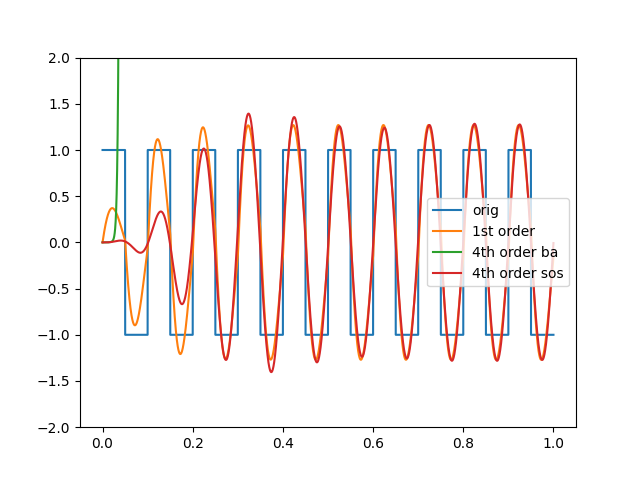
@Irreducible is correct. You have created filter coefficients that expose a numerical stability issue in the case of a 4th order Butterworth filter. As suggested, express the filter as second order sections and your filter will be fine:
import numpy as np
import scipy as sp
import matplotlib.pyplot as plt
from scipy import signal
fs=20000
bt,at= signal.butter(4,[7.692307692307693,13],'bandpass',fs=fs)
b1,a1= signal.butter(1,[7.692307692307693,13],'bandpass',fs=fs)
t = np.linspace(0, 1, fs, endpoint=False)
freq = 10
sqr_wave = signal.square(2 * np.pi * 10 * t)
plt.plot(t, sqr_wave,label='orig')
sqr_wave_1st_order = signal.lfilter(b1, a1, sqr_wave)
plt.plot(t, sqr_wave_1st_order,label='1st order')
sqr_wave_4th_order = signal.lfilter(bt, at, sqr_wave)
plt.plot(t, sqr_wave_4th_order,label='4th order ba')
sos_4th_order = signal.butter(4,[7.692307692307693,13],'bandpass',fs=fs,output='sos')
sqr_wave_sos = signal.sosfilt(sos_4th_order, sqr_wave)
plt.plot(t, sqr_wave_sos,label='4th order sos')
plt.ylim(-2, 2)
plt.legend()
plt.show()
I have been facing the same issue on Eclipse v 2023-12, and the resolution consisted of using the last version of Lombok at least on this link https://projectlombok.org/download I have taken the version Lombok v1.18.36enter image description here
This article may be helpful, Making Mocking Functions Strongly Typed in Python
You can use neologger library, it gives you the customisation you need.
You can find the detailed examples here: NeoLogger: A Developer’s Solution to Effortless, Beautiful Logging for Python Apps
Also, the pip project's homepage: neologger
Hope it helps.
self.resource = resource_class.confirm_by_token(params[:confirmation_token]) if resource.errors.empty? set_flash_message(:notice, :confirmed) if is_flashing_format? sign_in(resource_name, resource) respond_with_navigational(resource){ redirect_to after_confirmation_path_for(resource_name, resource) } else redirect_to new_user_session_path #respond_with_navigational(resource.errors, :status => :unprocessable_entity){ render :new } end end
For those who are still looking for an answer to the above question - this seems to work:
df_patient["Date de naissance"] = pd.to_datetime(df_patient["Date de naissance"]).dt.strftime('%d-%m-%Y')
Try to use display() instead of print()
There are common issues happen when is not work:
Sorry for the very late response on this guys lost access to my account and found the best solution for this issue I was having thanks for the comments.
Thank you, Morinar, for your contribution; it helped me a lot. I'm sharing a small modification to Morinar's method that works.
private void setWindowsPlacesBackground(Container con) {
Component[] components = con.getComponents();
for (int i = 0; i < components.length; i++) {
Component c = components[i];
// If we find a WindowsPlacesBar, we nullify the "XPStyle.subAppName" property
if (c instanceof sun.swing.WindowsPlacesBar) {
System.out.println("Found WindowsPlacesBar, nullifying XPStyle.subAppName property...");
((sun.swing.WindowsPlacesBar) c).putClientProperty("XPStyle.subAppName", null);
// Now you can apply the background color
c.setBackground(new Color(101, 96, 118)); // Change the color here
return; // Exit, as we have modified the first WindowsPlacesBar found
}
// If the component is a container, we continue searching recursively
if (c instanceof Container) {
setWindowsPlacesBackground((Container) c);
}
}
}
The fix:
CreatedAtAction(nameof(UsersController.GetUserById), "Users", new {userId = user.Id}, user);
Commandline was opened with target as path hence it was not deleting in my case. Closed the terminal and done a maven clean and it worked like magic.
You can use a library like https://imagemagick.org/script/magick++.php to complete the task:
#include <Magick++.h>
Magick::Color color(red, green, blue);
Magick::Geometry size(width, height, /*xOff=*/0, /*yOff=*/0);
Magick::Image image(size, color);
image.write( "image.jpg" );
See https://www.imagemagick.org/Magick++/Image++.html for some more examples.
I currently have the same issue (and am also doing the MIT deeplearning course). The reason for the issue is (I think) because there's been a change to the Keras API. I am not sure what the alternative keyword arg would be, and I haven't found anything yet.
https://www.tensorflow.org/api_docs/python/tf/keras/layers/Embedding
The embedding layer doesn't have anything at all relating to batch_input_shape. Unfortunately, I have very little knowledge on the Keras API and deep learning in general. I will keep posted if I find a solution.
The Solution was just adding on the package.json file those lines at the stript commands:
start": "webpack-dev-server --config webpack.config.js",
"build": "webpack --config webpack.config.js"
Specifying the config script file
For me it was the problem, that I tried to install the app in Release mode to my simulator. Changing the build configuration to debug solved the problem.
Xcode version 16.1 - Simulator iOS 18.1
I've solved this myself. Seems that it was just one record that was causing the error so I deleted the record and created a new duplicate. The code works as originally written. Thank all.
I just changed the the build action in the file properties to another and back to MauiIcon again. So the reference is set new and there is no longer an error.
try this
go env | grep GOMODCACHE
i was dereferencing a value that shouldn't have been dereferenced (std::cout << *upp.CommandLine.Buffer;)
from what ive read the context menu class in VScode is usually a child of .monaco-menu.
Also check this link: https://stackoverflow.com/a/57729835/27796957
I think it will answer your question
close the wamp
Go to C:\wamp64\scripts
there is a file refresh.php
open it in code editor, then finde this:
$WampStartOnOri = $wampConf['wampStartDate'];
press ctrl + f to finde faster
paste this under that line you finde
$WampStartOnOri = str_replace(['۰','۱','۲','۳','۴','۵','۶','۷','۸','۹'], ['0','1','2','3','4','5','6','7','8','9'], $WampStartOnOri);
save it and run WAMP , Enjoy it,
send me love in [email protected] lool
I'm using Spring MVC with Thymeleaf also. Mine is a combo of a couple of answers that considers both cases. Changing return to void probably works; i was doing that in another method, but if you need to return a String because you need to return a name of a view/web page to go to next, it is now working for me if I return null; at the end of the method.
So staying with return of String:
I can do: return "redirect:/login"; if needed
before I write to outStream.
but if I do write to outStream, which works, I get an error,
I cannot return a string, even "" after that
but if I return null; after writing to outputStream that works.
spring boot 3.3
Example:
public function setTitleAttribute($value)
{
$this->attributes['title'] = $value;
$this->attributes['slug'] = Str::slug($value);
}
Another option nobody mentioned is to install from source! No need for pip or virtual environments. Simply download source and python setup.py install. I find this the best and less tedious way, especially that I use many modules that aren't provided by apt. Also, this approach works nicely with Dockerfile.
I'm no expert in VBA, but it seems like it's looping through correctly, but you're applying the cell.value multiplication to the entire column each iteration. What you want instead is to calculate the multiplication to each individual cell, and place that value to the right..
Instead of
Range("C3:C11").Value = Cell.Value * 1.5
You probably want something like
Cell.Offset(0, 1).Value = Cell.Value * 1.5
For future someone,
As @kmdreko pointed out, I was using diesel_migration=="2.2.0" but was using an old syntax. My current syntax working fine as follows:
use diesel_migrations::{embed_migrations, EmbeddedMigrations, MigrationHarness};
pub const MIGRATIONS: EmbeddedMigrations = embed_migrations!("migrations");
Simplest solution I could find:
pip3 install myst-parser, then add extensions = ["myst_parser"] to your conf.py.
In your .rst file,
.. include:: ../README.md
:parser: myst_parser.sphinx_
Done. No need for any intermediary files.
I’m very new to all of this but have a question I suspect has an obvious (to the more learned folks) answer. In some of the above responses the datasets begin at 0,0,0,0,0 and finish with 0,1,1,1,1 … OR begin with 0,0,0,0,1 and finish with 1,1,1,1,1. I guess you see my question is why are there not 32 combinations, which would include bot all 0s and all 1s ??? Thank you for any response/s. Steve
I understand about classes, objects, this keyword, constructors, and instantiation. That's the reason I'm asking the question.
Without an object, this expression:
ERROR = setParamForNamedCallableStatement(lstSqlParams, inputDataMap, daoInputMapDef, ncs){};
Should fail to compile, but it doesn't. It's not a static method. This is a Struts 2 project.
I'm trying to do the same thing, but the values don't seem to match. I don't understand what the equivalent column is in the API.
This is probably not the most logical fix, but I selected the numbers I would be trying to add/sum, hard-code those numbers (copy, paste as values), and then Ctrl+Z - the sum function would fix itself this way.
Or just:If Int(DoubleVar) = DoubleVar then MsgBox("DoubleVar is a whole number")
Using tw & inline styles
<Textarea
placeholder="Type something..."
className="resize-none border-none p-0"
style={{
borderColor: "inherit",
WebkitBoxShadow: "none",
boxShadow: "none",
}}
rows={5}/>
@Roman's response helped to fix the issue if I wanted to build/push the docker image from my local machine; however, it didn't help when doing the same from inside github actions. I had to add the following steps to the github actions workflow file to fix the Docker authentication issue with GAR: more here
- name: 'Login to GAR'
uses: 'docker/login-action@v3'
with:
registry: ${{ env.REGION }}-docker.pkg.dev
username: _json_key
password: ${{ secrets.GCP_SERVICE_ACCOUNT_KEY }}
Note: you need to replace the env/secret with your own of course.
For future readers (as well as myself) These are not regular expressions! See the GitHub actions documentation for the syntax rules.
im also new here. I dont see your page load function, you dont need the saved theme to load anymore?
you need to execute jboss-cli.sh without -c or without --connect example:
[disconnected /] module add --name=com.oracle.jdbc --resources=/path/to/ojdbc6.jar --dependencies=javax.api,javax.transaction.api
then you jboss-cli.sh -c and execute host=master:reload
Many thanks to Topaco for pointing me in the right direction. Using their code, I was able to make some more progress. But, when I tried their solution, I still ran into this weird could not find file specified error. However, all I needed to do was adjust some IIS settings to resolve that issue. I set up a new app pool, enabled 32-bit applications, and set "Load user profile" to True.
Unfortunately, I still couldn't generate valid tokens. One issue was getting the right date format, so after some more Googling I modified some code I found to get dates generating in the correct format.
Later, after meeting with a developer from the payment processor, I realized I was trying to validate my tokens incorrectly. I didn't have the public key to go with my private key, so I was doomed to get "Invalid Token" on jwt.io. I then checked the tokens generated with Topaco's first solution using CngKey's, and my token was indeed valid. Once I knew there wasn't an issue with the tokens, I also fixed the API link I was using and voila, my requests were going through!
All in all, here's a simplified version of the code I have ended up with. All this requires is installing jose-jwt and RestSharp NuGet packages.
Imports Jose
Imports RestSharp
Imports System.Net
Imports System.Net.Http
Imports System.Security.Cryptography
Imports System.Web.Http
Module MyModule
Public Const KEY_ID = "...."
Public Const PRIVATE_KEY =
"-----BEGIN PRIVATE KEY-----
.....
-----END PRIVATE KEY-----"
'Gets proper format for JWT time
Public Function GetSecondsSinceEpoch(utcTime As DateTime) As Int64
Return (utcTime - New DateTime(1970, 1, 1, 0, 0, 0)).TotalSeconds
End Function
'Removes the enclosure and any whitespace
Public Shared Function ConvertPkcs8PemToDer(ByVal pkcs8Pem As String) As Byte()
Dim body As String = pkcs8Pem.Replace("-----BEGIN PRIVATE KEY-----", "").Replace("-----END PRIVATE KEY-----", "").Replace(Environment.NewLine, "")
Dim reg = New Regex("\s")
body = reg.Replace(body, "")
Return Convert.FromBase64String(body)
End Function
'Creates a UUID-formatted string.
Public Shared Function CreateJti() As String
Return Guid.NewGuid().ToString()
End Function
Public Function MakeMyRequest(uri As String, json_body As String) As String
'Fixes a weird .NET bug
ServicePointManager.SecurityProtocol = SecurityProtocolType.Ssl3 Or SecurityProtocolType.Tls12 Or SecurityProtocolType.Tls11 Or SecurityProtocolType.Tls
'Create RestRequest things
Dim rest_uri As New Uri(uri) 'Uri of the API to call
Dim rest_client As New RestClient With {.BaseUrl = rest_uri}
Dim rest_request As New RestRequest With {.Method = Method.POST} 'Or whatever Method your API requires
Dim rest_response As New RestResponse
'Add JSON body and headers
rest_request.AddJsonBody(json_body) 'Make sure this matches the API specifications
rest_request.AddHeader("accept", "application/json")
rest_request.AddHeader("Content-Type", "application/json")
'Conver the PEM string to Pkcs8 format, acceptable to CngKey.Import()
Dim privatePkcs8Der As Byte() = ConvertPkcs8PemToDer(PRIVATE_KEY)
Dim privateEcKey As CngKey = CngKey.Import(privatePkcs8Der, CngKeyBlobFormat.Pkcs8PrivateBlob)
'Claims and headers
Dim iss = "MyIssuer"
Dim aud = "MyAudience"
Dim iat = GetSecondsSinceEpoch(Now().ToUniversalTime()) '.ToUniversalTime ensures your local UTC offset doesn't affect the timestamp
Dim exp = GetSecondsSinceEpoch(Now().AddMinutes(5).ToUniversalTime())
Dim kid = KEY_ID
Dim headers = New Dictionary(Of String, Object)() From {
{"alg", "ES512"},
{"typ", "JWT"},
{"kid", KEY_ID} 'Key ID may not be necessary for your scenario, but put whatever extra parameters are required here like username, password, etc
}
Dim payload = New Dictionary(Of String, Object)() From {
{"iss", iss},
{"aud", aud},
{"iat", iat},
{"exp", exp},
{"jti", CreateJti()}
}
'Generate the token using the payload, CngKey, ES512 algorithm, and extra headers
Dim token = Jose.JWT.Encode(payload, privateEcKey, JwsAlgorithm.ES512, headers)
'Excecute the request
rest_request.AddHeader("Authorization", "Bearer " & token)
rest_response = rest_client.Execute(rest_request)
'Check for your API's designated response code
If rest_response.StatusCode <> 201 Then Throw New Exception("An error occurred processing the request.")
Return rest_response.Content
End Function
End Module
There are probably several ways to land this, but below is what I do. While there could be some optimization to this, it works well so long as the error is within the django app and not with the webserver itself.
in urls.py: (don't see any difference here).
if not DEBUG: # i don't want custom error handling in my dev environment because i want to see the dump to help with troubleshooting.
handler500 = '<project>.views.custom_500'
in views.py: I see some differences here... don't know if they are necessarily material or not.
def custom_500(request, *args, **argv):
context = {'<load up the data i need to send to the custom template>',}
t = loader.get_template('error.html')
response = HttpResponseServerError(t.render(context))
response.status_code = 500 # need to set this to ensure flags the error and sends dump data to admins.
return response
@sina_Islam were you able to resolve this?
I had this same problem but solved it another way. psql requires that less is available on the system, and my Docker container did not have it. I simply ran apt update && apt install less and then psql worked properly.
Force Re-render: Another way is to use the extraData prop, which forces FlatList to re-render when data changes.
<FlatList
data={data}
extraData={data} // Force FlatList to re-render on data change
keyExtractor={(item) => item.id}
renderItem={({ item }) => <Text>{item.name}</Text>}
/>
Looks like the AssetManager is directly available simply by using assetManager! For example:
class MainActivity : FlutterActivity() {
override fun configureFlutterEngine(flutterEngine: FlutterEngine) {
super.configureFlutterEngine(flutterEngine)
val assetManager: AssetManager = assets
...
}
}
You would have to either make it a global to alter contents in another function or use list that only holds that one variable. Lists are automatically passed by ref.
I hope this helps.
I saw the same issue. It had a pending password reset on the account. After resetting the password it works fine.
You need to install the Samsung Certificate Extension from the package manager and create a Samsung certification. Then rebuild tizenbrew with the new certificate.
If the user is having a browser with PDF reading capabilities (or a plugin) and the corresponding settings to open PDF files in-browser, the PDF will open like that.
See: How to force a Download File prompt instead of displaying it in-browser with HTML?
Are you specifically dealing with PDFs? Or does this happen for all files?
I have successfully installed Flutter and VS Code on a Raspberry Pi Model 4B with 8G of RAM and a touchscreen. I have a series of YouTube videos explaining installing and running embedded system programs on the Raspberry Pi. For development, you must use the model with 8G of RAM. For deployment, you can run on a model with 4G of RAM. I used the dart_periphery package to do various GPIO input and output, PWM, and I2C for temperature, humidity, and barometric pressure. Check out my channel for more information.
for osx i had to use history -d <line#> <line#> where <line#> is the specific line targeted for deletion - enter it twice to make it work
I just ran pyspark through Docker and Jupyter notebook through http://127.0.0.1:8888/lab?token=43c4d728856ca538f02dee742187a90536424d6218260675
This token was generated through my terminal and I utilized https://hub.docker.com/r/jupyter/all-spark-notebook to get the whole system up and running. Let me know if anyone has any questions regarding this
I had a code signing issue on my Mac which caused Apache to fail. The new Sequoia Update had installed a new LoadModule to Apache which was not "code signed". I found the problem .so module in the apache logs by running: sudo apachectl -k start -e debug
What you want to do to fix: Open your apache2.conf config file and locate the offending LoadModule Line of code. Then add your certificate name in quotes: eg. "Joe Smith"; after the line. Restart your apache: sudo apachectl restart.
This seems to have cleared up, so I believe Stoplight.io fixed an issue.
try updating your condition to compare with the integer 1 instead
df["season"] = np.where(df["Month"] == 1, df["Year"] - 1, df["Year"])
No. It is not possible unless the page is in the same domain as the retrieving page. Instead, you could use an iframe's srcdoc attribute + Javascript fetch() to get the HTML of another page.
I was finally able to resolve the same issue by a simple solution with credit to Du Nguyen here!
just from "C:/Documents" find this file named ".Renviron", which could be hidden, and delete it. Everything will work normal!
As @jqurious pointed out in the comments, this is easily solved with...
df_resampled.explode(pl.exclude("colA"))
One big part of this is sns.ecdfplot. In particular see this SO answer:
Code to produce the cumulative distribution plots:
import seaborn as sns import pandas as pd sns.ecdfplot(pd.DataFrame({'x': x, 'z': z}))
The only solution I found is to export Surv again
#' re-export Surv from survival
#'
#' @importFrom survival Surv
#' @name Surv
#' @noRd
#' @export
NULL
Be sure to have this code loading before any of your package functions
try to use this command "npx react-native run-android --terminal" for me its worked!!!.
If you use redis will work from console or job
Thanks @BigBen - solution was forgetting to include 'ignore_index=True'. Now to figure out why my other projects worked without it...