Similar issue here but with 3.12.4 kernel, I have noted that error when printing out such --> name=input("please enter your name: "), I have to interrupt the execution and restart the kernel
The funny is if write it on a plain .py program (rather a .ipynb) it works!
I faced the same problem a year ago. In my case, it was due to trying to install everything manually. However, jafingerhut has nice scripts to get everything set up and running correctly on a fresh Ubuntu 20.04/22.04/24.04 install. And virtual machine images too, in case that's an option for you.
I am trying to do more or less the same. You can install the LoRa-RF python library (standard one, not a third party), as all the implementation is thought to be with SPI. Or maybe you can use https://github.com/chandrawi/LoRaRF-Python , that is more or less the same but with some upgrades (third party).
I have worked with SX127X as it seems to be fine.
But i am struggling with SX1262. As i always get 0x00 from the SPI. This, for example, is the output of your program: GetStatus
0x0
GetPacketStatus
0x0
ReadBuffer
0x0
0x0
0x0
0x0
0x0
0x0
0x0
0x0
0x0
0x0
But i have tried with very simple tests and always get 0x00. My RPi SPI seems to be working fine as i can connect with the already mentioned SX127X. But i am unable with SX126X. My comm jumpers are both at B and the M1 and M0 are both short.
Do you have any idea of what can be happening to me, as you seem to have this working?
It's a suggestion, if there's an inconsistency, plz point it out.
So, what if traversal start with max value of used compared to capacity, then after that it selects nxt node based on say highest used/cap ratio in its neighbors and so on, if it reaches a node that doesn't have untraversed neighs, it can backtrack,and u can continue this way endlessly
It is closed ticket, but let there be noted the solution>
select query text right click / preferences / Resource / Text file encoding - other / US-ASCII
Hello I developed a desktop web automation program with C# selenium, but when publishing it, it does not work on another computer (without Visual Studio 2022 installed) and gives this error. What should I do?
enter image description here
Reasons:
Blacklisted phrase (1): enter image description here
import openpyxl
from openpyxl.styles import Font
col_range = sh.max_column  #get max columns in the worksheet
for k in range(1, col_range + 1):
    sh.cell(row=4, column=k).font = Font(name='Arial', size=8)
I find this solution that seem like work well.
Sure is not best and elegant solution but i'm working with few data and i don't care too much to benchmark and i have only 2 days for develop calendar in custom cms.
I stuck for a few hours on .refreshEvents() but seem like to work only with function or json but i can't manipulate data from db in the cms RESTAPI and i need to do in my browser JS.
This is my solution, declare and render calendar in function:
let calendarEl=[] // Global declaration
calendarOption={events: calendarEvent} // Calendar option

async function  createCalendar (){
      await $.get("/calendar/getAllEvents", function (response) {
            refreshEvents(response.data) // fnc manipulate response
          })
        // Declare calendar
        let calendar = new Calendar(calendarEl, calendarOption);
        calendar.destroy();
        calendar.render();
    }
In manipulation function i fetch the end point for update but if the calendarEvent.length>0 i set length of array to 0. This is the only solution that i find working. If you set calendarEvent=[] give me some issue and refresh not work.
function refreshEvents (data){
            //calendarEvent=[] This not work
            if(calendarEvent.length>0){
              // this work
              calendarEvent.length = 0
            }
            for (let i = 0; i < data.length; i++) {
                const el = data[i];
                // manipulate data
                event={
                    // create event object
                }
                // update global array
                calendarEvent.push(event)
            }
         }
In the end i call createCalendar() on startup and after insert/update/delete action
$(document).ready(async function () {
      await createCalendar ()
      .
      .
}
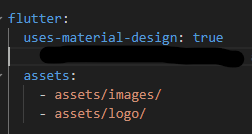
Just create another default project. Then copy old folders lib, assets and paste in new project.
Copy the dependencies packages in pubspec.yaml and paste it into new pubspec.yaml. Change also ndk version to highher ex:"25.1.8937393" in build.gradle. Ensure targetSdk, compileSdk, minSdk versions is properly put. Update version into settings.gradle
Finally, try run project. It's done!!! :)
In aws console, go to EKS,and create access entry (of the type Standard) for the user - > first add AmazonEKSAdminViewPolicy and then test you are able to run basic view commands such as kubectl get svc. Then come back to console and in same access entry, edit to also add AmazonEKSClusterAdminPolicy.
Sometimes, creation of access policies is hindered by errors if you try to add multiple policies at same time, so go sequentially.
Some of the answers above are missing a vital piece of information:
L1 or L2 regularization of a vector of parameters IS NOT THE SAME AS NORM of that vector of respective order.
It is NOT WRONG to apply different regularization to different layers or even on selected model parameters only. It is only a best practice to apply it consistently on all model parameters. For example, what if I want first layer of my model to be more interpretable than the second? Given that,
Given the above reasons,
the statement in @rainy's answer:
l1_regularization += torch.norm(param, 1)**2
should be modified to:
l1_regularization += torch.norm(param, 1)
because norm of order 1 wasn't square-root(ed) and **2 would make the term as |w|^2, which is not even l1 or l2 :P
because norm of order 2 is square-root(ed) and l2 regularization should be without square-root, although adding a square root version would simply scale down the gradients.
You can pass the parameter recreate="always" to the method batch_alter_column so that a new table is created and the old one is deleted. This way, you won't have problems with prior constraints. This can be helpful with the migrations of not so big tables (as otherwise the performance would be bad). Check Alembic's docs here.
TensorFlow Data Validation is not officially supported on Python 3.12. It is compatible with python versions 3.9 to 3.11. To install tensorflow-data-validation==1.15.1, consider using Python 3.10 or Python 3.11. Check this document for compatible python versions.
Yes, it is possible to integrate Spring Boot with Angular so they would run in one project. Try to follow this steps:
Build the Angular Application with an Angular CLI. Ready files should be generated in the dist/ folder.
Copy those files in the directory of your Spring Boot project. It is usually src/main/resources/static directory.
Configure Routing in Angular. If your Angular app uses client-side routing, you need to configure Spring Boot to forward all unknown requests to index.html so the Angular router can handle them.
Run or Package the Spring Boot Application.
Access Your Application. Once the Spring Boot application is running, both the frontend and backend will be accessible from the same URL (e.g., http://localhost:8080).
If your application becomes bigger, it is better to separate the frontend and backend for scalability reasons.
You should also check that your build process integrates this approach if you're automating CI/CD pipelines.
There's an organizational visual called Gantt created by Microsoft. Then load the data in the correct form with the columns "Name, Start Date, End Date", then stacked on a visual. Turn on Group Tasks in Visual Formatting, General, and it organizes the data into the form shown in the image.
برای درج نیم فاصله در phpstorm (یا هر نرم افزار دیگری) نیازی به نصب persian(standard) نیست. این عمل اصلا توسط نرم افزار رخ نمیدهد و مربوط به سیستم عامل هست. در سیستم عامل ویندوز این عمل با کلید میانبر shift+ctrl+2 انجام میشود (حتما باید زبان روی فارسی باشد). در حالی که در phpstorm این کلید میانبر ست شده است. شما برای اینکه نیاز نداشته باشید persian(standard) رو نصب کنید و به دردسر تغییر بین فارسی نرمال و استاندارد برنخورید، نیاز هست که در نرم افزار phpstorm این کلید رو از رزرو حذف کنید. برای اینکار باید به settings برید و قسمت keymap و سرچ کنید mark در نتیجه ای که میاد کمی اسکرول کنید به بخش زیر میرسید
enter image description here
همینطور که در عکس مشاهده میکنید، گزینه Toggle Bookmark 2 که روی کلید میانبر ctrl+shift+2 بوده رو حذف کردم و از این به بعد بدون نیاز به نصب persian (standard) میتونم با همین زبان فارسی پیشفرض در سیستم عامل، و با زدن کلید ctrl+shift+2 نیم فاصله ایجاد کنم.
لطفا اگر سوالی داشتید در مورد کار با ادیتورها به تلگرام من با id @arefalapour پیام بدید.
با تشکر
Reasons:
Blacklisted phrase (1): enter image description here
Chosen plan. Consumption plan can have up-to 10 minutes delay. So if you have your development environment or both environments using consumption plan results can be inconsistent.
Using Always On for App Service. If there are differences between environments, this can cause issues (mostly slowness, perhaps missed events)
And also I would check that the environments are actually separate and that there are no hidden dependencies (using same App Service, etc.)
It could be that Engine only tracks one target at a time, as a default. I don't know about VUforia Engine SDK integration with Flutter, but you can set the number of simultaneous tracked images with the Engine API.
Just note that only image-based targets support simultaneous tracking. Model Targets and Area Targets can only be tracked one at a time. This article has more information: Detect and track targets simultaenously.
You can build the frontend and copy it over to the static resources of your Spring Boot application.
You can create a task in Gradle / Maven that will copy over the frontend build files from your frontend project (should be the "dist" folder since you're using Angular) and copy it over to /resources/static in your Spring Boot Application.
Articles such as this one explain this really well.
Thx to @(Martin Brown) because he found the problem.
I copy here his comment:
"... The sort rule is converting accented characters to their
unaccented form and then using length as a presort. It puts words with/without accents close to each other but in a funny way! The location of abc after sorting surprised me! – Martin Brown"
I get this error when I check the google pagespeed: A character encoding declaration is required. It can be done with a tag in the first 1024 bytes of the HTML or in the Content-Type HTTP response header. Learn more about declaring the character encoding.
The line "> is inserted in the header do you guys know what it can be?
This is a bug in the 2024-12 release of the Eclipse Scout SDK plugin.
You can try to update your Eclipse 2024-12 to the nightly version which includes a fix:
Go to Help -> Install new Software...
Enter "https://download.eclipse.org/scout/nightly/13.0/" in the "Work with" URL field and hit enter to populate the list.
In the list below category "Scout Application Development SDK" select "Eclipse Scout SDK" (choose at least version 13.0.0.20241209-2344)
Press Next and wait until all alternate solutions have been computed.
Choose alternate solution "Update my installation to be compatible with the items being installed" and press Next. This uninstalls the existing and installs the nightly version.
On the "Install Details" page review the config and press Finish.
Disable allJava related extentions that did not need to my project.
like
Gradle for Java
Debugger for Java
Extention Pack for Java
Java Laguage Support
Project manager for Java
Test Runner for Java
VSCode Java Debugger Extras
Maven for Java
Try to create the new local project in your current flutter version and run that and see.
sometimes the flutter version may not support to the repository project, For that you can try the flutter version which used on the time of developing the project.
In some cases there will be key properties files which will not seen in repo.
so this may be also the reason for the problem.
I have the same issue; it appears to be related to the permissions that the Claude Desktop app has to run node/npx. Unfortunately I've not been able to resolve yet.
you should check te documentation of FCM about this problem. I have this problem now but i resolve modify my request to FCM. Parameters as "priority" help me to solve this problem. To android i used proxy and priority to
Maven archetypes provide a basic project structure but require more manual configuration. Spring Boot starters, on the other hand, offer a pre-configured and opinionated approach to Spring Boot development. This significantly reduces the amount of boilerplate code and configuration needed.
While both tools can simplify project setup, Spring Boot starters deliver a more streamlined and automated experience for developers. By understanding the differences between these two approaches, you can choose the right tool to meet your specific project needs.
Thanks all for your help with this. In the end it was actually a network issue which was really hard to debug, and so stackoverflow friends didn't have all the info - sorry!
Th actual solution: All of the computers run the the same VPN, but it turns out MSS clamping was not enabled on some routers, which meant the VPN dropped packets. Strangely, all other network activities worked fine, it just caused an issue with the Azure TTS API - weird!
(MSS Clamping is a network setting that adjusts the Maximum Segment Size (MSS) of TCP packets to ensure they fit within the limits of your network path, especially when using tunnels like VPNs.)
Spark dependencies in the pom.xml have a scope of "provided", that makes Spark to verify the libraries to be available on the runtime classpath. However, in most cases, they are not pre-installed on your system.Hence change the scope of these dependencies to "compile".
The issue might be that the actual encoding of the CSV file is different from UTF-8.
Look for an encoding declaration in CSV file or use a text editor that supports encoding detection,
then update your code with the desired encoding.
Thanks @TheCableGUI, I did all the above. However, Clang 16.0.0 is not available for Ubuntu 22.04.5. I installed Clang 16.0.1 with an assupmtion it would be compatible. The installation runs and terminates after hours.
when initializing the useForm hook all I needed to do was pass in the additional option called "defaultValues". This would set my form field values from the get go.
Having been in the position where a project broke when switching to Composer 2, I have the same problem. Sure, in my case it was a bug that caused it which Composer 1 handled differently to Composer 2, but that doesn't matter. It means we can't switch Composer version across all projects blindly. It needs to be done and tested on a per-project basis. So I did some digging.
plugin-api-version has been added in Composer v1.10.0. It doesn't appear that the plugin API version is identical to the Composer version, but it would appear that the major version at least matches, so it suffices to know whether Composer 1 or 2 has been used. However, you must keep in mind that plugin-api-version is missing from composer.lock files built with Composer version 1.9.0 or earlier. Based on that info, I wrote this shell script:
for f in $(find projects/ -maxdepth 2 -name composer.lock); do echo -n $f:; grep plugin-api-version $f || echo "plugin-api-version missing"; done
Solved the problem this way:
I left the database in English, and when migrating entities to Django, renamed the model fields to Cyrillic, specifying db_name in models.py. After that everything is displayed correctly in both the application and the database
This issue doesn't seem to be related ot shadcn-ui. I think the npm package @jridgewell/gen-mapping broke something.
First delete your package-lock.json and your node_modules folder. Then install version 0.3.4 of the package and afterwards just do an npm install again.
It is a bit weird, I tried to save your plot with tiff() and dev.off() and it seems to work.
I did not modify anything about your plot (t), so if you run your code and then run my code below you should find the plot (named test1.tiff) in your working directory.
Maybe the issue was related to the dimensions of the image you were creating? 1100x600 seems to work fine to me (unless I'm missing something)
tiff(paste0(getwd(), "/test1.tiff"), height = 600, width = 1100)

t

dev.off()
The server(Openlitespeed) I was using was at fault. I'm unsure why, but the docker-registry running behind OLS always fails with content-length header issues. The simple solution was to use nginx-proxy-manager.
Also, if someone is trying to self-host a docker registry, be aware of Cloudflare's max upload size.
Hexagonal architecture and microservices are powerful tools that, when combined, can create robust, scalable, and maintainable software systems. By understanding how these two architectural styles complement each other, you can design and build better software.
I have been facing an issue while configuring Certificate-Manager with Autopilot GKE Cluster, the error I was getting is below:
Internal error occurred: failed calling webhook
"webhook.cert-manager.io":failed to call webhook: Post
"https://cert-manager-webhook.cert-manager.svc:443/validate?timeout=30s":
tls: failed to verify certificate: x509: certificate signed by unknown
authority
Basically, you need to install the Cert-Manager through Helm and override the global.leaderElection.namespace with the namespace you are deploying everything into usually it should be cert-manager, so you should execute below commands:
Although it's an old thread, I recently came across this "Buffer underflow" exception and my problem was deserialization with LUA script using CompositeCodec (key and value in Redis HASH).
Be careful of using the same serialization encode/decode when you access the data from different Client (Redisson, LUA script, etc...).
Using request.auth.get("FieldName") is indeed a cleaner and better approach if you're using a framework like Django REST Framework (DRF) with a JWT authentication package, such as SimpleJWT.
So it looks like it has to do with the serverless tier.
I have tested a few different things and having serverless always hurts the latency.
The documentation is a bit sneaky where they say that the point reads are <10 ms for both, but the provisioned are covered by an SLA (service level agreement) and the serverless is covered by a SLO (service level objective).
Moving to a provisioned tier gives 2-4 ms response times, with a few exceptions. Like promised.
Setting spark.driver.extrajavaoptions and spark.driver.extrajavaoptions to -Dlog4j2.configurationFile=<path to my log4j2.properties file> -D-Dlog4j2.debug worked for me. The steps on the page https://logging.apache.org/log4j/2.x/faq.html#troubleshooting are quite helpful.